
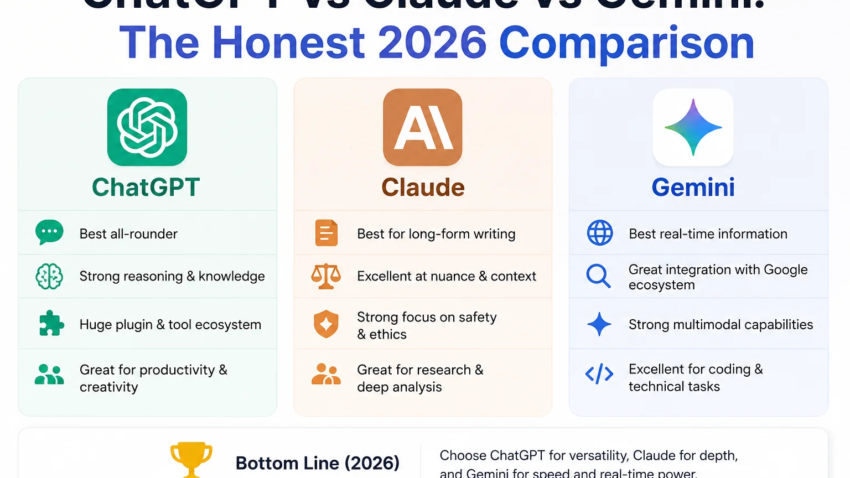
ChatGPT vs Claude vs Gemini: The Honest 2026 Comparison
Three weeks ago I was paying for all three. ChatGPT Plus, Claude Pro, and Google AI Pro, twenty bucks each, sitting on my credit card statement like some kind of AI subscription hoarder. My wife asked why I needed three chatbots that “basically do the same thing.” I didn’t have a good answer at the time. I do now.
I run a small content and dev shop, so I’m in these tools every single day, sometimes all three in the same hour. Writing client emails in one tab, debugging a Python script in another, pulling research with a third open on my second monitor. This isn’t a lab test. It’s just what actually happened when I tried to use each one for real work over the past few months, including the mistakes that cost me time I didn’t need to lose.
Why I even bothered comparing them
I used to be a “just use ChatGPT for everything” person. It was the first one I tried back in the day, it’s the one everyone talks about, and honestly it’s good enough for most casual stuff. But then I hit a wall on a coding project last winter. I was refactoring a messy Node backend, and ChatGPT kept confidently rewriting functions in ways that broke other parts of the app. It sounded right. It wasn’t right. I lost an afternoon before I gave Claude a shot on the same task, mostly out of frustration.
Claude caught two bugs I hadn’t even flagged, and it didn’t touch code it wasn’t asked to touch. That was the moment I stopped treating this as a one-app decision.
What each one is actually good at (from using them, not reading spec sheets)
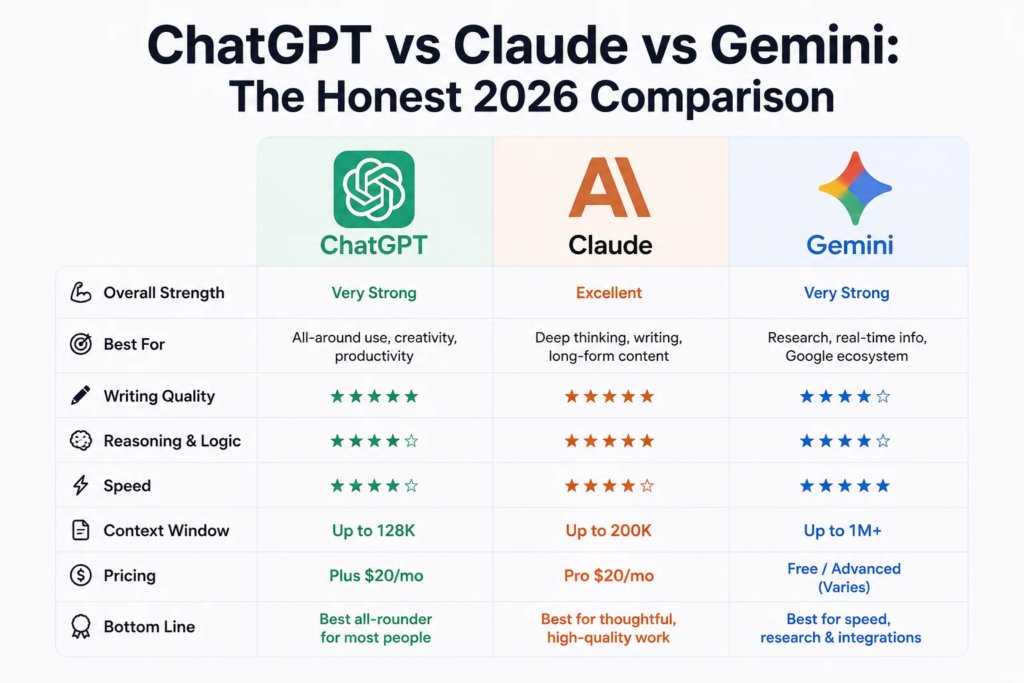
Claude, for writing and coding that has to hold up. If I’m drafting a long client proposal, editing a chapter, or working through a gnarly bug in a large codebase, Claude is where I go first. The prose it produces doesn’t have that stiff, over-explained “AI voice” that makes readers bounce. It also tends to follow specific style instructions (“shorter paragraphs,” “cut the corporate tone”) more consistently than the other two. On the coding side, Anthropic’s Claude Code tool has genuinely changed how I work, it runs right in the terminal and can plan out multi-step changes across a codebase instead of just spitting out a snippet and hoping for the best.
ChatGPT, for everything else, and for range. This is the one I open when I don’t know exactly what I need yet. Voice mode is great for talking through an idea on a walk. The image generation is handy for quick mockups. It has the biggest ecosystem of plugins and custom GPTs, so if there’s some weird niche task, there’s probably already a tool for it. It’s also just faster to get a “good enough” answer out of, which matters when you’re firing off twenty small questions a day.
Gemini, when Google Workspace or fresh information matters. I don’t reach for Gemini as often, but when I do, it’s usually because I need something pulled from a live Google Doc or Sheet, or because I need up-to-date info from the actual web rather than a knowledge cutoff. It’s baked right into Gmail and Docs if you’re already living in that ecosystem, which saves a genuine amount of copy-pasting.
A real example: the same task, three different results
To be fair to myself and not just go on vibes, I ran one identical test across all three: “Write a 150-word product description for a ceramic coffee mug, casual tone, for an Etsy listing.”
- ChatGPT gave me something solid but a little generic, it used “elevate your morning routine,” which is the kind of phrase I now mentally flag as filler.
- Gemini’s version was fine but front-loaded with bullet points I didn’t ask for, and it felt a bit stiff for a casual Etsy listing.
- Claude’s version actually sounded like a person wrote it. No forced enthusiasm, no cliché phrases, and it matched the “casual” instruction without me having to specify further.
That’s obviously one small test, not proof of anything universal. But it lines up with a pattern I’ve seen consistently: Claude tends to sound less “AI-written” out of the box, which matters a lot if you’re publishing content and don’t want to spend twenty minutes de-roboting every paragraph.
Step-by-step: how I’d actually pick, if I were starting fresh
- Figure out your main use case first. Don’t sign up for all three like I did. Ask yourself: am I writing/coding, or am I doing a bit of everything, or am I glued to Google Docs and Sheets all day?
- Use the free tier before paying anything. All three offer a limited free version. Run your actual, real work through them, not toy prompts, for about a week.
- Test the thing that matters most to you, head-to-head. If it’s writing, paste the same brief into two tools and compare tone. If it’s code, give both the same buggy function.
- Check your privacy comfort level. ChatGPT and Gemini train on your conversations by default unless you dig into settings and opt out. Claude keeps that off by default and doesn’t train on your chats unless you choose to allow it. If you’re pasting in client work or anything sensitive, that’s worth knowing before you paste, not after.
- Only pay for one, at first. All three land around $20/month for the pro tier, so the cost isn’t really the deciding factor, capability for your specific task is. Add a second subscription later only if you find yourself constantly wishing you had it.
Mistakes I made so you don’t have to
I trusted ChatGPT’s code output without actually reading it line by line, because it sounded confident. Confidence is not the same as correctness. Read the diff every time, regardless of which tool wrote it.
I assumed Gemini’s web-connected answers were automatically more accurate just because they were “live.” Live doesn’t mean verified. I got a wrong stat once because it pulled from a source that was itself outdated.
I also wasted money for a solid month paying for three subscriptions when my actual daily use could’ve been covered by one plus a free-tier backup. Don’t do that unless you genuinely need the redundancy for work.
Common mistakes people make when choosing
- Picking based on brand recognition alone. ChatGPT being the most famous doesn’t mean it’s the best fit for your specific task.
- Never switching after a bad first impression. Model quality moves fast in this space, a tool that felt weak six months ago might be genuinely strong now. Gemini’s coding ability, for instance, has improved a lot since I first wrote it off.
- Ignoring context window limits until you hit them. If you’re feeding in a long contract or a big codebase, check the token limits before you start, not after your session cuts off mid-task.
- Assuming one tool has to win. It doesn’t. A lot of people I know, myself included, end up using two tools for different jobs rather than forcing one to do everything.
Where I’ve landed
I still keep Claude and ChatGPT active. Claude handles anything I’m going to publish or ship, writing, editing, and code that needs to actually work the first time. ChatGPT is my generalist, quick answers, brainstorming, image stuff, the odd voice conversation while I’m cooking dinner. I dropped Gemini down to the free tier since I only need it occasionally for Workspace-heavy days, and the free version covers that fine for now.
None of these tools is “the best AI” in some universal sense, and anyone telling you there’s one clear winner is probably trying to sell you something. What actually matters is what you’re using it for this week, not which one wins a benchmark chart you’ll never personally notice the difference on. Try the free tiers, run your real work through them, and let your own results make the call.

Hamad Arshad
SEO Specialist | SEO Manager | GEO Strategist
7+ Years of Experience in SEO, GEO, AEO, AI SEO, Local SEO, Technical SEO, PPC, Google Ads & Meta Ads.




Leave a Reply