
Prompt Seen Trending Boy AI Photo
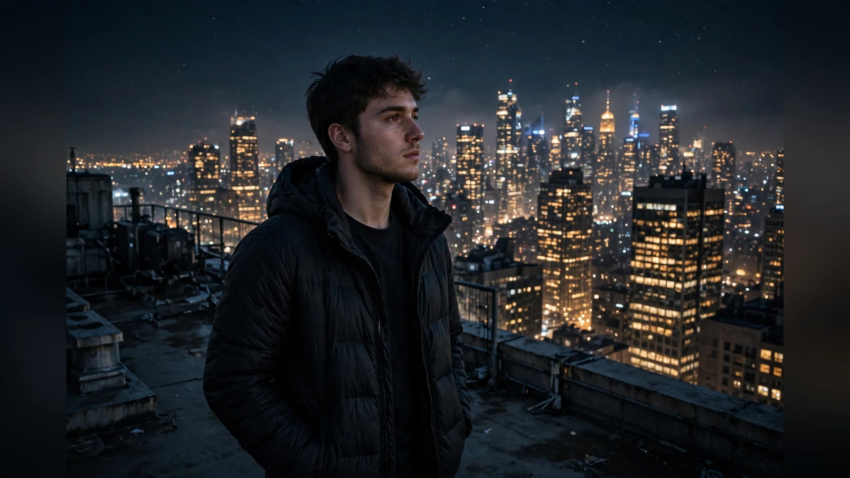
If you scroll Instagram or TikTok today, one pattern is everywhere — ordinary selfies turned into extraordinary scenes. A boy on a rooftop above a glowing city. The same boy in a snow valley, then in a royal palace, then walking through rain like a movie hero. Every one of those photos started as a normal picture plus one thing — a scene prompt in Google Gemini.
This page is a copy-paste collection of the trending scene prompts for boy AI photos. Each prompt below puts you in a complete scene — place, mood, light, and outfit — while keeping your real face. Pick a scene, paste the prompt, and Gemini builds the photo around you.
If you want outfit-based styles instead, see our Gemini AI photo prompt copy paste trending boy collection, and for prompts for everyone, the full Gemini AI photo prompt copy paste list.
How to Turn Your Photo Into Any Scene
- Open the Gemini app or gemini.google.com and upload one clear photo of your face.
- Copy a scene prompt below and paste it into the chat.
- Send — Gemini places you in the scene in a few seconds.
- Download in full quality and post.
Every prompt starts with “keep my face 100% same” — never delete that line. It is what separates a photo of you in a new scene from a photo of a stranger.
City Scenes
Scene 1 – Rooftop City Night
“Edit my photo into a rooftop night scene. Keep my face 100% same. I am standing on a high-rise rooftop, glowing city skyline behind me, wearing a black jacket over a white t-shirt, wind in my hair, cinematic night photography, ultra realistic.”
Scene 2 – Metro Station Look
“Transform my photo into a metro station scene. Keep my face 100% same. I am standing on a clean modern platform as a train blurs past behind me, wearing a denim jacket and headphones around my neck, cool blue lighting, urban photography.”
Scene 3 – Old Street Walk
“Edit my photo into an old street scene. Keep my face 100% same. I am walking down a narrow heritage street with colourful old buildings, wearing a kurta and sunglasses, warm afternoon light, travel photography.”
Nature Scenes
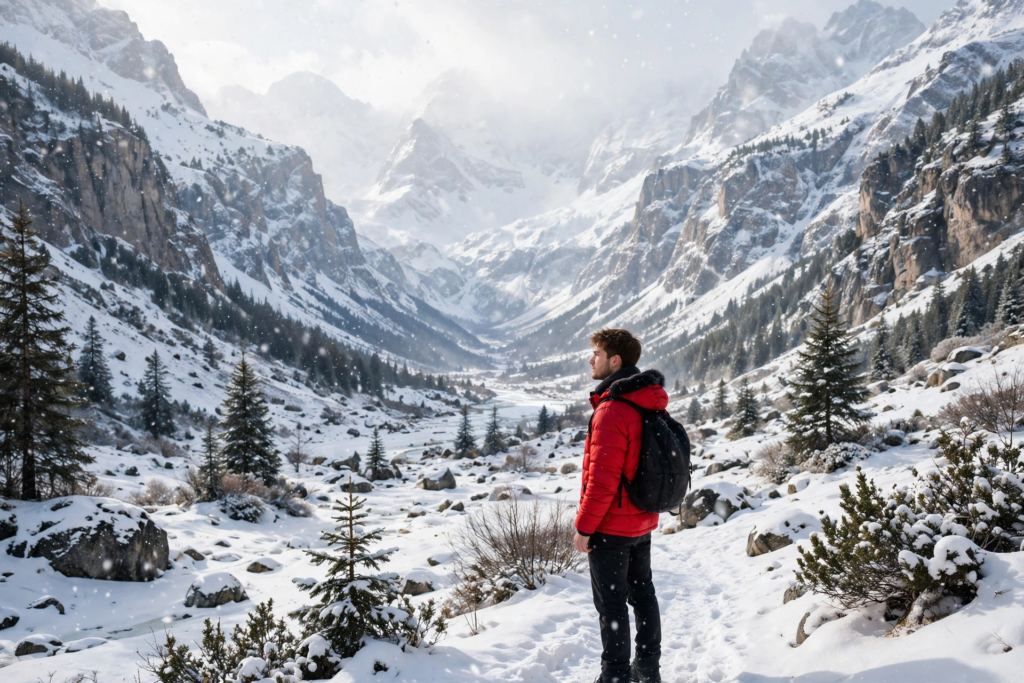
Scene 4 – Snow Valley Scene
“Transform my photo into a snow valley scene. Keep my face 100% same. I am standing among snowy mountains wearing a red winter jacket and gloves, soft snowfall around me, bright cold daylight, epic travel photography, ultra detailed.”
Scene 5 – Waterfall Scene
“Edit my photo into a waterfall scene. Keep my face 100% same. I am standing on wet rocks in front of a tall green waterfall, wearing a casual checked shirt, mist in the air, fresh natural light, realistic nature photography.”
Scene 6 – Desert Sunset Scene
“Transform my photo into a desert sunset scene. Keep my face 100% same. I am sitting on golden sand dunes wearing a white shirt, orange sky behind me, long shadows on the sand, cinematic warm photography.”
Royal and Classic Scenes
Scene 7 – Palace Scene
“Edit my photo into a royal palace scene. Keep my face 100% same. I am standing on palace stairs wearing an embroidered sherwani, carved pillars and golden light around me, premium wedding photography, ultra realistic.”
Scene 8 – Vintage Car Scene
“Transform my photo into a vintage scene. Keep my face 100% same. I am leaning on a classic vintage car on a quiet street, wearing a brown blazer and round sunglasses, warm retro colour tones, old-film photography look.”
Scene 9 – Library Scholar Scene
“Edit my photo into a grand library scene. Keep my face 100% same. I am sitting at a wooden table with tall bookshelves behind me, wearing a dark sweater, holding an open book, soft golden lamp light, calm premium photography.”

Sports and Action Scenes
Scene 10 – Cricket Stadium Scene
“Transform my photo into a cricket stadium scene. Keep my face 100% same. I am standing on the pitch holding a cricket bat, floodlights glowing, crowd blurred in the stands behind me, heroic sports photography, ultra detailed.”
Scene 11 – Football Turf Scene
“Edit my photo into a football turf scene. Keep my face 100% same. I am standing on a green turf at night with a football at my feet, wearing a team jersey, stadium lights above, dramatic sports photography.”
Scene 12 – Mountain Biker Scene
“Transform my photo into a mountain adventure scene. Keep my face 100% same. I am standing with a mountain bike on a rocky trail, pine forest and peaks behind me, morning light, adventurous travel photography.”
Movie Style Scenes
Scene 13 – Rain Hero Scene
“Edit my photo into a cinematic rain scene. Keep my face 100% same. I am walking through heavy rain on a neon-lit street without an umbrella, wearing a dark shirt, water reflections everywhere, dramatic movie-still photography.”
Scene 14 – Train Window Scene
“Transform my photo into a train journey scene. Keep my face 100% same. I am sitting by a train window looking outside at green fields passing by, soft daylight on my face, peaceful travel mood, realistic photography.”
Scene 15 – Beach Bonfire Scene
“Edit my photo into a beach night scene. Keep my face 100% same. I am sitting near a small bonfire on the sand with friends’ silhouettes blurred around, wearing a casual hoodie, starry sky above, warm firelight, cinematic photography.”
Make Any Scene Prompt Yourself
The pattern behind every trending scene is simple — face line, place, outfit, light, style. Once you see it, you can build unlimited scenes of your own:
“Keep my face 100% same. I am at [place], wearing [outfit], [light or mood], ultra realistic 4K DSLR photography.”
That structure — clear subject, scene, and style — is the same foundation taught in our guide on how to become a prompt engineer. Swap the brackets and your one photo becomes a hundred scenes.
FAQ
It is the current social media trend where a boy’s normal photo is edited with Google Gemini using a scene prompt — a text instruction that places him in a new scene, like a rooftop, snow valley, palace, or stadium, while keeping his real face. You upload a photo, paste a scene prompt, and download the result.
Open the Gemini app, upload a clear front-facing photo, copy any scene prompt from this page, paste it in the chat, and send. Gemini generates you inside that scene within seconds. Always keep the first line, “keep my face 100% same”, so the face stays yours.
Right now the most shared ones are the rooftop city night scene, the snow valley scene, the cricket stadium scene, and the rain hero scene. Traditional palace scenes also trend heavily during wedding and festival season.
Usually the uploaded photo was low light or the prompt asked for too many things at once. Use a daylight selfie, keep one clear scene per prompt, and add “ultra realistic, 4K, natural skin texture” at the end. Regenerating once or twice almost always sharpens the result.
Yes — use the pattern at the end of this page: face line first, then your place, outfit, lighting, and photo style. Any place you can describe in one line — a village rooftop, a college gate, a desert road — Gemini can build as a scene around your photo.
Yes, scene edits work on the free Gemini plan, which has a daily image limit. All 15 prompts on this page work free — copy, paste, generate, and post.

Hamad Arshad writes and edits AI Next Top from Rahim Yar Khan, Pakistan. He has worked in SEO and digital marketing for over 7 years and started this site to explain AI tools and news in plain language for non-technical readers. Every guide here is checked against the real tool before it is published.








Leave a Reply