
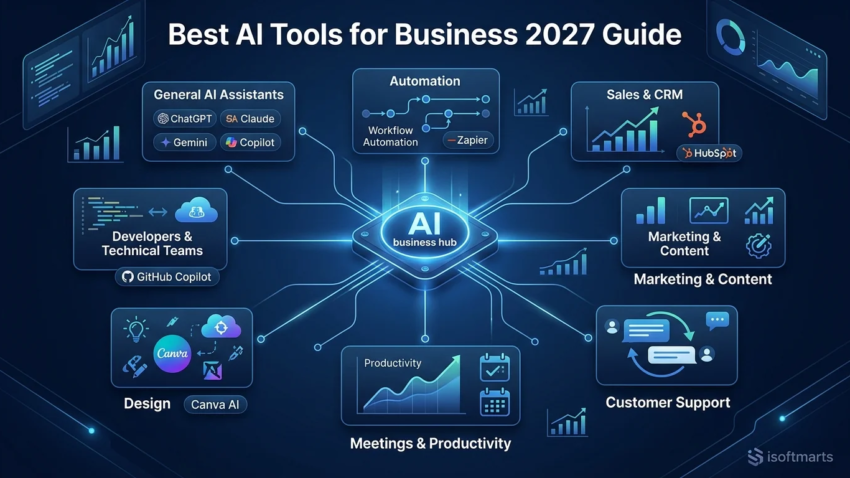
Best AI Tools for Business 2027 Guide
The AI tools businesses actually rely on have consolidated significantly — a handful of general-purpose assistants now anchor most workflows, with specialized tools layered on top for specific functions like sales, support, and automation. This guide cuts through the noise of “top 30” roundups padded with filler entries and focuses on what’s genuinely worth adopting, organized by the actual business function each tool solves.
This is written for small business owners, freelancers, and professionals deciding where to start or expand their AI adoption. We’ll cover the strongest tool in each major category, realistic ROI ranges based on current industry data, a framework for choosing your first tool, and an honest look at what’s likely to change as this space keeps moving into 2027.
Quick Answer: The Best AI Tools for Business Right Now
For most businesses, the strongest starting point is a general-purpose AI assistant — ChatGPT, Claude, or Microsoft Copilot — paired with one function-specific tool for your biggest bottleneck: Zapier or n8n for automation, HubSpot for sales/CRM, Canva AI for design, or Otter.ai/Fathom for meeting notes. Claude tends to be the stronger pick for long-document and careful writing work, Gemini integrates most naturally for Google Workspace teams, and Copilot for Microsoft 365 teams. Most businesses see the clearest early ROI from customer support deflection, sales outreach drafting, and meeting/note automation, based on current industry-reported benchmarks.
How We Categorized and Evaluated These Tools
Rather than ranking every AI product on the market, this guide organizes tools by the specific business function they solve — general assistance, automation, sales, marketing, support, meetings, design, and development — since “best AI tool for business” genuinely depends on which bottleneck you’re solving for. Within each category, the tools included here are consistently named across multiple current, independent comparisons as category leaders, rather than included to pad the list to a round number. Pricing is noted where relevant but should be confirmed directly with each vendor, since AI tool pricing changes frequently.
Best AI Tools for Business by Category
Best General-Purpose AI Assistants
ChatGPT, Claude, Google Gemini, and Microsoft Copilot cover the bulk of general business assistance — drafting, research, analysis, and Q&A — and most businesses should have one of these as a baseline tool before adding anything specialized. Which one to start with often comes down to your existing ecosystem: Gemini integrates most naturally if your team already lives in Google Workspace, Copilot if you’re on Microsoft 365, while ChatGPT and Claude work well as standalone assistants regardless of ecosystem, with Claude frequently cited as the stronger choice specifically for longer documents and careful, nuanced writing. Perplexity is worth adding specifically for research-heavy work, given its focus on cited, sourced answers rather than general conversation.
Best AI Tools for Automation and Workflows
Zapier remains one of the most accessible no-code options for connecting apps and automating repetitive tasks — moving data between your CRM, email, and project management tools without custom development. n8n is a strong alternative, particularly for teams that want more control or a self-hosted option, while Make offers a similar visual-workflow approach. For businesses already using Microsoft 365, Copilot’s automation features can cover simpler workflows without adding a separate tool.

Best AI Tools for Sales and CRM
HubSpot’s AI-enabled CRM is a frequently recommended starting point specifically because it pairs core CRM functionality with built-in AI writing and outreach assistance, and offers a genuinely usable free tier — a meaningful advantage for a small business not ready to commit to enterprise CRM spend. Larger or more complex sales organizations often graduate to Salesforce’s AI capabilities (branded Einstein), which offer deeper customization at a correspondingly higher price and implementation complexity.
Best AI Tools for Marketing and Content
Jasper and Grammarly Business anchor this category — Jasper for brand-voice-consistent content generation at scale, Grammarly Business for writing quality and consistency across a team. Surfer SEO and Semrush’s AI features are the natural next layer for teams specifically focused on search-driven content, helping align content with what’s actually likely to rank rather than just generating text. A small marketing team combining a couple of these tools has, in current industry reporting, been able to noticeably increase content output without proportionally increasing headcount.
Best AI Tools for Customer Support
Intercom’s AI features and similar AI-enabled help desk tools are consistently cited as strong options for deflecting routine tier-1 support tickets — password resets, order status, basic FAQs — freeing human agents for the conversations that actually need judgment. This is one of the categories where current industry-reported ROI is most concrete, since ticket deflection is directly measurable against support headcount and response time.
Best AI Tools for Meetings and Productivity
Otter.ai and Fathom are the most frequently recommended tools for AI-assisted meeting notes and transcription, both offering genuinely useful free tiers before any paid commitment is needed. Notion AI extends into broader knowledge work — organizing notes, summarizing documents, and structuring team knowledge bases — making it a natural complement rather than a competitor to a dedicated meeting tool.
Best AI Tools for Design
Canva AI is the clear default recommendation for non-technical teams needing marketing graphics, presentations, and basic design work without a dedicated designer, given its combination of ease of use and a genuinely capable free tier. For teams building more polished decks specifically, tools like Prezent are worth considering as a more presentation-focused alternative.
Best AI Tools for Developers and Technical Teams
GitHub Copilot remains the standard recommendation for AI-assisted coding, well-integrated into existing developer workflows rather than requiring a separate tool switch. For data-heavy technical teams, DataRobot and ThoughtSpot are frequently cited for AI-assisted data analysis and business intelligence, aimed at technical users comfortable with more complex tooling than the average business-function AI product.
What Kind of ROI Can You Actually Expect From Business AI Tools?
Based on current industry-reported small-and-mid-business deployment data, realistic ranges look roughly like this: marketing teams commonly report a 30–50% lift in content output per writer once an AI writing tool is adopted; sales teams report 20–30% more meetings booked from AI-assisted outreach drafting, plus meaningful time saved per rep from AI-generated call summaries; customer service teams report deflecting 40–60% of routine tier-1 tickets; and finance teams using AI for accounts-payable processing report substantial reductions in processing time. Typical payback periods on a modest AI tool stack are commonly reported in the range of two to four months.
These figures come from current industry benchmarking rather than a single controlled study, and actual results depend heavily on execution — the same reporting consistently notes that businesses seeing disappointing ROI usually adopted a tool without actually changing the underlying workflow around it, rather than the tool itself underperforming. Treat these as directional planning figures, not a guarantee for your specific business.

How to Choose Your First AI Tool: A Decision Framework
- Identify your actual bottleneck first. Where does your team lose the most hours to repetitive, low-value work — content creation, customer support, data entry, or sales outreach? Start there rather than picking the most talked-about tool.
- Start with one general assistant plus one function-specific tool. Every business benefits from a baseline assistant (ChatGPT, Claude, or Copilot) plus a single specialized tool layered on top for the highest-priority function — resist the urge to adopt five tools simultaneously.
- Check what you already have access to. Before purchasing anything new, confirm whether your existing Google Workspace or Microsoft 365 subscription already includes AI features that solve your bottleneck.
- Match the tool to your team’s technical comfort. Non-technical teams generally do better starting with Canva AI or a CRM’s built-in AI features; technical teams can move faster into automation platforms like n8n or developer tools like GitHub Copilot.
- Roll out in phases and measure. A practical approach: pick one workflow and one tool, write approved usage guidelines, test with real work for a few weeks, then decide whether to expand, adjust, or replace it — rather than a company-wide rollout on day one.
What’s Likely to Change in Business AI by 2027
This section is explicitly forward-looking analysis, not a claim about specific unreleased products. Based on the trajectory of the last two years, a few trends seem reasonably likely to continue: deeper integration of AI directly into existing productivity suites (Google Workspace, Microsoft 365) rather than as separate standalone tools, meaning some of today’s specialized tools may see their core functionality absorbed into platforms businesses already pay for; continued movement toward AI “agents” that complete multi-step tasks with less manual prompting, particularly in automation and customer support; and increasing enterprise scrutiny on AI governance, security, and compliance certifications (SOC 2, GDPR) as adoption scales beyond early experimentation into core operations. What’s genuinely uncertain is which specific vendors will lead each category by 2027 — this is a fast-moving, well-funded market, and the safest approach is choosing tools based on your current bottleneck and switching cost, not betting heavily on any single vendor’s long-term dominance.
Common Mistakes When Adopting AI Tools for Business
Adopting too many tools at once. Rolling out five AI tools simultaneously across a small team usually produces confusion and low actual usage rather than five times the value — start narrow and expand deliberately.
Buying a tool without changing the underlying workflow. Current industry reporting consistently points to this as the single biggest driver of disappointing ROI — the tool doesn’t fail on its own; it fails when it’s bolted onto an unchanged process.
Ignoring AI features already included in existing subscriptions. Paying for a new standalone tool when Google Workspace or Microsoft 365 already includes a comparable feature is a common and avoidable cost.
Not accounting for data privacy and security requirements. Assuming every AI tool handles business or customer data the same way, rather than checking specific compliance certifications for tools handling sensitive information, is a frequent and preventable oversight.
Choosing based on hype rather than your actual bottleneck. The most-discussed AI tool online isn’t necessarily the right first tool for your specific business — matching the tool to your actual time-sink matters more than chasing whatever’s trending.

FAQs About the Best AI Tools for Business
What is the best AI tool for a small business overall? Most current comparisons point to ChatGPT as the strongest single starting tool for small businesses, given its general-purpose flexibility across writing, research, and basic automation — though Claude, Gemini, and Copilot are all strong alternatives depending on your existing software ecosystem.
What’s the best free AI tool for business? ChatGPT’s free tier, Claude’s free tier, Microsoft Copilot (included free with a Microsoft account), HubSpot’s free CRM (which includes AI writing features), Canva’s free tier, and Fathom’s free meeting-recording tier are all commonly cited as genuinely usable starting points before any paid commitment.
Which AI tool should I use for Microsoft 365 vs. Google Workspace teams? Microsoft Copilot integrates most naturally for teams already using Microsoft 365, while Google Gemini is the better fit for Google Workspace teams — both build directly into tools your team likely already uses daily.
How much should a small business budget for AI tools? Current industry reporting suggests a modest stack in the $200–500/month range is typical for a small business seeing measurable ROI, though this varies significantly based on team size and how many functions you’re covering.
What ROI can I actually expect from AI tools? Based on current industry benchmarks, ranges commonly reported include 30–50% higher content output for marketing, 20–30% more meetings booked in sales, 40–60% ticket deflection in customer support, and payback periods of roughly two to four months on a modest tool stack — though actual results depend heavily on how well the tool is integrated into your existing workflow.
Is ChatGPT or Claude better for business use? Both are strong general-purpose assistants; ChatGPT is often recommended as the most adaptable all-around starting tool, while Claude is frequently cited as the stronger choice specifically for long-document work and careful, nuanced writing.
What’s the best AI tool for automating repetitive tasks? Zapier remains one of the most accessible no-code automation options for most small businesses, with n8n and Make as strong alternatives, particularly for teams wanting more customization or a self-hosted option.
Do I need multiple AI tools, or is one enough? Most businesses benefit from one general-purpose assistant plus one function-specific tool addressing their biggest bottleneck — adding many tools at once tends to produce lower actual adoption than a focused, phased rollout.
Are AI tools safe for handling business/customer data? It depends on the specific tool and plan — many enterprise-tier AI products offer encryption, audit logs, and compliance certifications like SOC 2 or GDPR, but free or consumer-tier versions of the same tools often don’t carry the same guarantees, so this should be checked per tool before using it with sensitive data.
Will these tools still be relevant in 2027? The core categories (general assistants, automation, CRM, content, support) are very likely to remain relevant, since they map to durable business functions rather than fads. Which specific vendor leads each category by 2027 is genuinely less certain, given how quickly this market is moving — choosing tools with low switching cost is a reasonable hedge against that uncertainty.
Final Takeaway
The businesses getting real value from AI tools in 2026 aren’t the ones that adopted the most tools — they’re the ones that matched a specific tool to a specific bottleneck and actually changed the workflow around it. Start with one general-purpose assistant that fits your existing ecosystem, add one function-specific tool for your biggest time-sink, measure whether it’s actually saving time or money after a few weeks, and expand deliberately from there. That approach will hold up regardless of which specific products lead each category by 2027, because it’s based on how you adopt AI, not just which logo you pick.

Hamad Arshad
SEO Specialist | SEO Manager | GEO Strategist
7+ Years of Experience in SEO, GEO, AEO, AI SEO, Local SEO, Technical SEO, PPC, Google Ads & Meta Ads.








Leave a Reply