
Best ChatGPT Model in 2026: Which One You Should Actually Use
Open ChatGPT today and the model picker looks different than it did even a few months ago — names have changed, some options have quietly disappeared, and a new flagship has started rolling out to some accounts but not others. If you’re trying to figure out which option is actually the best one to use, the honest answer depends less on chasing the newest name and more on knowing what your specific plan gives you access to right now.
This guide breaks down the current ChatGPT lineup as of mid-September 2026, plan by plan, so you can stop guessing at the picker and pick with confidence.
Quick Answer: The Model Most People Should Pick Right Now
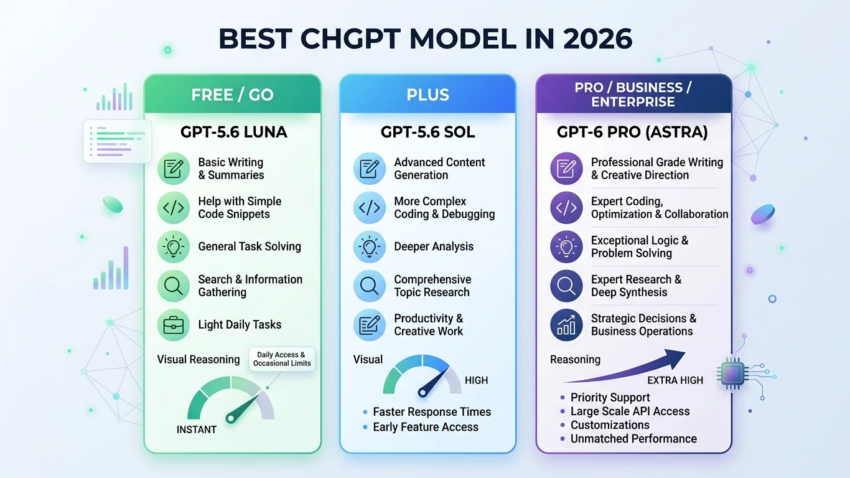
As of today, OpenAI’s most capable model is GPT-6 Astra, branded inside ChatGPT as GPT-6 Pro, but it’s only available in regular chat on Pro, Business, and Enterprise plans — Plus subscribers currently get it only inside ChatGPT Work and Codex, not the everyday chat window, and Free and Go users don’t have access to it at all. For everyone else, the practical “best” model is GPT-5.6 Sol, which powers the Instant/Medium/High/Extra High reasoning slider on paid plans, while Free and Go users run on GPT-5.6 Luna, a lighter but still capable model that also powers the “Think” feature. In short: if you’re on Pro, Business, or Enterprise, look for GPT-6 Pro in your picker; if you’re on Plus, GPT-5.6 Sol with the reasoning slider is your best available option in normal chat; if you’re on Free, you’re automatically using Luna with no picker at all.
Why This Question Doesn’t Have One Universal Answer
A year ago, the entire GPT-5 family launched as a single unified model with an Instant and Thinking mode. Since then, OpenAI has released several updated generations under the same GPT-5 name (culminating in the GPT-5.6 family) and, most recently, introduced GPT-6 Astra as a distinct, more capable flagship. On top of that, older models — GPT-4o, GPT-4.1, GPT-4.1 mini, o4-mini, and the original GPT-5 — were formally retired from ChatGPT on February 13, 2026, so any advice built around those names is no longer relevant. The result is that “best ChatGPT model” isn’t a single fixed answer the way it might have been for a more stable piece of software — it’s a moving target tied to your plan and to a rollout that’s still in progress for the newest model as of this writing.
What’s Actually in the Current ChatGPT Lineup
The current lineup breaks down into two generations running side by side:
- GPT-5.6 family — the workhorse generation, with three tiers: Sol (flagship, powers the reasoning slider on paid plans), Terra (a balanced middle tier), and Luna (the lightweight default for Free and Go users, also used by “Think”). Sol carries roughly a 1.05-million-token context window with up to 128,000 tokens of output.
- GPT-6 Astra — OpenAI’s newest and most capable model, rolling out since early September 2026. Inside regular ChatGPT chat, it’s labeled GPT-6 Pro and is currently limited to Pro, Business, and Enterprise plans. Plus subscribers get GPT-6 Astra specifically inside ChatGPT Work and Codex, not the standard chat picker — a distinction that’s tripped up a fair number of Plus users who expected to see it show up everywhere after OpenAI’s launch announcement.
OpenAI has described Astra as its strongest model yet for computer-use tasks, software engineering, cybersecurity, and other professional and scientific work, with meaningfully faster performance on complex, multi-step computer-based workflows compared to Sol. Since the rollout is gradual, being on an eligible plan doesn’t guarantee the model is available in your account yet — OpenAI hasn’t published a fixed date for full rollout completion.
Best ChatGPT Model by Plan and Use Case
Rather than naming one universal winner, here’s what’s actually best for each plan and situation, since that’s the decision people are really trying to make.
If You’re on the Free Plan
Free (and Go) accounts run on GPT-5.6 Luna automatically, with no manual model picker at all — including when you use the “Think” feature for harder questions, which also runs on Luna rather than a separate, more powerful model. This is a real capability gap compared to paid tiers, but Luna is still meaningfully more capable than the older free-tier models it replaced, and it’s a reasonable option for everyday writing, basic research, and general questions. If you’re consistently running into its limits — long documents, complex reasoning, or coding work — that’s the clearest signal it’s time to consider Plus rather than trying to work around Luna’s limits with prompting tricks.

If You’re on Plus
Plus gives you GPT-5.6 Sol in regular chat, with a reasoning slider (Instant, Medium, High, Extra High) that lets you trade speed for depth depending on the task. For day-to-day writing, brainstorming, and quick questions, Instant is the right default — ChatGPT can also auto-escalate to more reasoning when a request needs it, even with Instant selected. For anything requiring careful multi-step thinking (complex analysis, tricky troubleshooting, longer planning tasks), manually bumping to Medium or High is worth the extra wait. GPT-6 Astra is technically included in a Plus subscription, but only inside ChatGPT Work and Codex — if you’re expecting to find it in the normal chat model dropdown, it isn’t there, and that’s expected behavior rather than a bug on your account.
If You’re on Pro
Pro plans get the fullest access currently available: GPT-6 Pro (Astra) directly in regular chat, alongside GPT-5.6 Sol Pro for the previous generation’s top-tier option. If your work involves genuinely hard, long-running tasks — deep research, complex coding projects, detailed professional documents — Pro is where the ceiling on model capability currently sits for individual accounts, and it’s worth checking the model picker directly rather than assuming Astra access based on general plan-tier marketing language, since rollout pacing has varied even within eligible plans.
If You’re Using ChatGPT for Business or Enterprise
Access here is controlled by workspace admins rather than being automatic, and can vary meaningfully between accounts on the same nominal plan tier — some Business configurations include full GPT-6 Pro access, others are more limited depending on the specific plan level an organization has purchased. If you’re on a managed workspace and don’t see an expected model, the model picker and your workspace’s admin settings are the actual source of truth, not general plan documentation, since admins can restrict which models members are allowed to use.
If You’re Choosing Specifically for Coding
For serious coding work, the guidance from OpenAI’s own product surfaces points toward GPT-6 Astra (via Codex, where Plus subscribers can access it even without seeing it in regular chat) for the hardest engineering tasks, with GPT-5.6 Sol as a strong, faster everyday coding option when you don’t need the absolute top tier. If you’re on Codex specifically, make sure your Codex CLI version is current — OpenAI has gated newer model access behind minimum CLI version requirements, and an outdated client is a common, easily overlooked reason a model appears unavailable when your plan should support it.
How the Reasoning Slider Actually Works
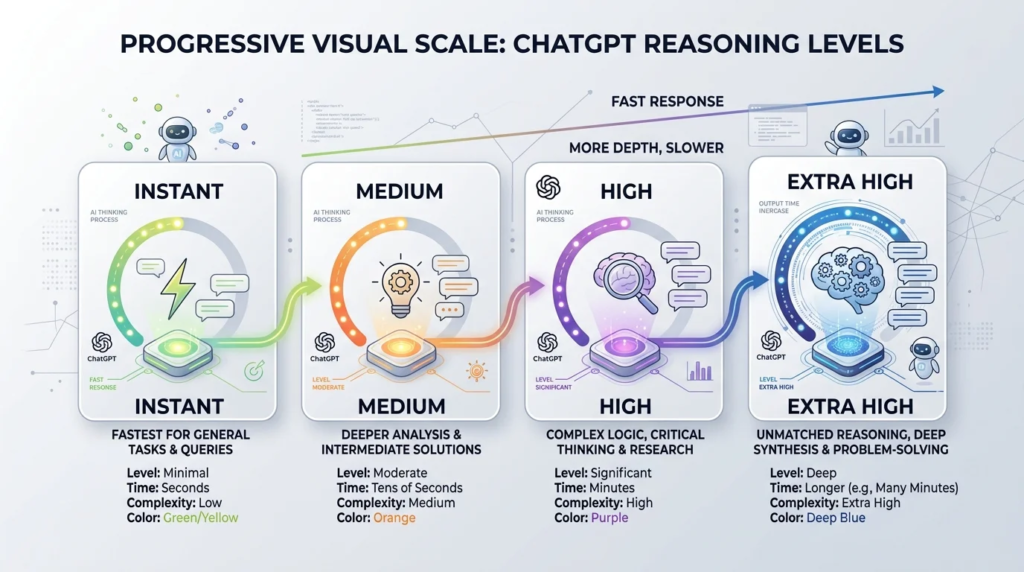
The Instant / Medium / High / Extra High slider isn’t a way of switching between entirely different models under the hood on a given tier — it’s a way of telling GPT-5.6 Sol how much deliberate reasoning effort to apply before answering:
- Instant — fastest response, minimal deliberate reasoning, best for quick questions and everyday writing.
- Medium — standard added reasoning, a reasonable default when a task is a bit more involved than a one-line answer.
- High — extended reasoning for genuinely complex, multi-step problems.
- Extra High — the deepest reasoning level available on Sol, best reserved for the hardest tasks since it’s noticeably slower.
Separately, a “Pro” option (where available) uses Sol Pro or GPT-6 Pro specifically, which is a different, more capable underlying model rather than just another reasoning-depth setting on the same model. ChatGPT can also automatically escalate reasoning depth on some plans even while Instant is selected, so you don’t always have to manually adjust the slider to get more careful reasoning on a request that clearly needs it.
Common Mistakes People Make Picking a Model
Assuming plan tier alone guarantees current access. Rollouts are gradual — being eligible for GPT-6 Pro doesn’t mean it’s live on your specific account yet, and checking the actual model picker beats assuming based on marketing copy.
Looking for GPT-6 Astra in the wrong place on Plus. It’s inside Work and Codex, not the standard chat picker — a frequent source of confused forum posts since launch.
Defaulting to the highest reasoning setting for everything. Extra High is slower and often unnecessary for simple requests; matching the reasoning level to the actual task saves time without a meaningful quality loss on easy questions.
Holding onto advice built around retired models. Guidance referencing GPT-4o, GPT-4.1, or the original GPT-5 as current options is outdated as of the February 2026 retirement — if an article or forum post is discussing those by name as “the current model,” it’s stale.
Not checking the Codex CLI or app version before assuming a model is unavailable. Gated minimum versions are a common, fixable reason a newer model doesn’t show up.
Where Even the Best Model Won’t Help
No model version fixes a vague prompt. Regardless of which tier you’re on, unclear instructions, missing context, and no example of what “good” looks like will produce a mediocre answer even from the most capable model available. Model choice also doesn’t substitute for reviewing important output yourself — for anything high-stakes (legal, medical, financial, or professional deliverables), treat even the newest flagship’s response as a draft that needs a human check, not a finished, verified answer. And a more capable model doesn’t always mean better results for simple tasks — for quick, low-stakes questions, Instant-level responses are often just as useful and considerably faster than escalating to the most powerful available option.
Expert Tips for Getting More Out of Whichever Model You Have
- Match the reasoning level to the task, not to habit — save High/Extra High for problems that genuinely need multi-step thinking.
- Check the model picker directly rather than relying on outdated screenshots in older articles or forum threads, since names and structure change frequently.
- If you’re on Plus and expecting GPT-6 Astra, look inside Work and Codex, not the standard chat window.
- Keep your app and Codex CLI updated if you’re on a plan that should include the newest model but it isn’t showing up.
- Don’t over-invest in chasing the newest model name for simple, everyday tasks — the practical difference is often small for basic writing and questions, and shows up mainly on harder, longer, or more technical work.
Frequently Asked Questions
What’s the best ChatGPT model right now? GPT-6 Astra (labeled GPT-6 Pro in chat) is OpenAI’s most capable current model, but it’s limited to Pro, Business, and Enterprise plans in regular chat, plus Work and Codex for Plus; for most other paid users, GPT-5.6 Sol is the practical best option available.
Is GPT-5 still available in ChatGPT? No — the original GPT-5 (Instant and Thinking), along with GPT-4o, GPT-4.1, GPT-4.1 mini, and o4-mini, were retired from ChatGPT on February 13, 2026, and all active models now belong to the GPT-5.6 family or GPT-6 Astra.
What’s the difference between GPT-5.6 Sol and GPT-6 Astra? Sol is the current flagship of the GPT-5.6 generation and powers the standard reasoning slider on paid plans; Astra is a newer, more capable model positioned above Sol, with particular strength in computer-use tasks, coding, and complex professional work, though its rollout and access are currently more limited.
Do free ChatGPT users get access to the best model? No — Free and Go accounts run on GPT-5.6 Luna, a lighter model, with no manual picker and no access to Sol or Astra.
Is ChatGPT Plus enough, or do I need Pro? Plus gives solid everyday access to GPT-5.6 Sol with the full reasoning slider; Pro adds direct chat access to GPT-6 Pro (Astra) itself, which matters mainly if you’re doing the hardest coding, research, or professional tasks rather than everyday use.
What does the reasoning slider (Instant/Medium/High/Extra High) actually do? It adjusts how much deliberate reasoning GPT-5.6 Sol applies before responding, trading speed for depth — Instant is fastest for simple tasks, Extra High is slowest but best for genuinely complex, multi-step problems.
Which model is best for coding specifically? GPT-6 Astra (accessible via Codex, even for Plus subscribers who don’t see it in regular chat) is positioned for the hardest engineering work, with GPT-5.6 Sol as a strong, faster default for everyday coding tasks.
Why don’t I see GPT-6 Astra in my model picker yet? Rollout is gradual even among eligible plans, so being on Pro, Business, or a Plus plan that technically includes access doesn’t guarantee it’s live on your specific account yet — check back, or confirm your app and Codex CLI versions are current if you’re expecting it in Codex specifically.
Does a higher-numbered model always mean better results? Not necessarily for every task — a newer or more powerful model generally handles harder, more complex work better, but for short, simple requests the difference is often minimal, and a faster, lighter option can be the more practical choice.
How often does OpenAI change the ChatGPT model lineup? Fairly often — this lineup has changed multiple times within a single year, including full model retirements and new flagship launches, so it’s worth checking the model picker directly rather than relying on older guides, including this one, without reverifying against current information.
Final Takeaway
There isn’t a single “best ChatGPT model” that applies to everyone — the honest answer depends on your plan and what you’re trying to do. GPT-6 Astra (GPT-6 Pro in chat) currently sits at the top for Pro, Business, and Enterprise users, and reaches Plus subscribers specifically through Work and Codex; GPT-5.6 Sol is the strongest practical everyday option for most paid users otherwise; and Free users run on GPT-5.6 Luna with no picker involved. Because this lineup changes on a timeline of weeks rather than years, the most reliable habit isn’t memorizing today’s names — it’s knowing to check your actual model picker before assuming what you have access to.

Hamad Arshad
SEO Specialist | SEO Manager | GEO Strategist
7+ Years of Experience in SEO, GEO, AEO, AI SEO, Local SEO, Technical SEO, PPC, Google Ads & Meta Ads.







Leave a Reply