
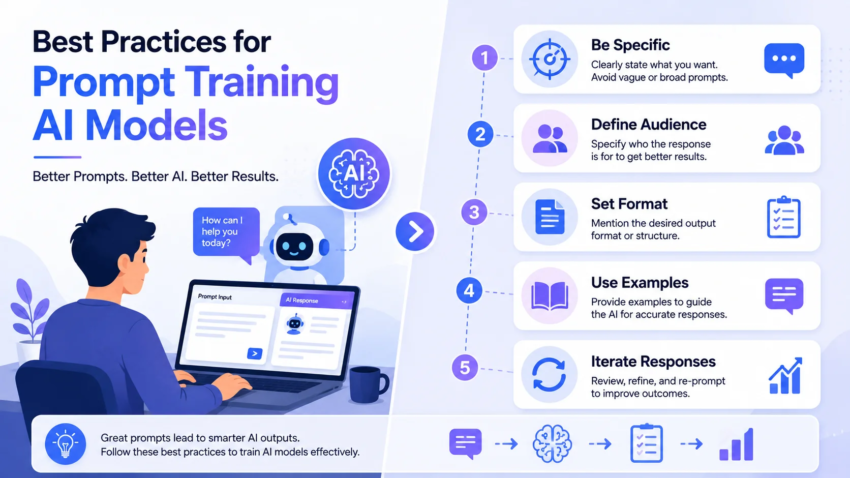
Best Practices for Prompt Training AI Models
I spent an entire Saturday afternoon arguing with a chatbot. Not out loud, obviously, but typing the same request into it maybe fifteen different ways, getting frustrated every single time it gave me something close but not quite what I needed.
I was trying to get it to draft product descriptions for an online store, and every version sounded like it was written by a robot reading a dictionary. Which, technically, it kind of was.
That afternoon is basically what got me into learning how prompting actually works, not just typing whatever comes to mind and hoping for the best. Since then I’ve used this stuff daily for work, testing things across ChatGPT, Claude, and Gemini, and I’ve picked up a bunch of habits that genuinely changed the quality of what I get back. Here’s what actually worked, plus the mistakes that taught me the hard way.
Wait, what does “training with prompts” even mean here
Quick clarification before we go further, because this phrase confuses people. You’re not retraining the model’s actual brain when you write a good prompt. The model’s core knowledge is already baked in from its original training.
What you’re doing is shaping how it responds to you, in this specific conversation, right now. Some people call this prompt engineering, some call it in-context learning. I just think of it as giving really clear instructions to a very capable but very literal assistant.
The better your instructions Best Practices for Prompt Training AI Models, the better the output. That’s basically the whole game.
The first mistake I made, over and over –
My early prompts looked like this: “Write me a product description for a coffee mug.”
Technically that’s a valid request. The AI will absolutely give you something. But it’s generic, because you gave it nothing to work with. No tone, no audience, no length, no specific selling point.
I kept blaming the tool for boring output, when really I just hadn’t given it enough to go on. Once I started adding real detail, the difference was almost embarrassing.
Compare that first attempt to this one: “Write a playful, 60-word product description for a ceramic coffee mug aimed at remote workers who love their morning coffee ritual. Mention the mug keeps drinks warm longer, and end with a light joke about Mondays.”
Same tool, same model, wildly different result. That one change taught me more than any tutorial did.
What actually works, based on months of daily use
Be specific about the audience and purpose. Who is this for, and what should happen after they read or use it? “Write an email” gets you nothing useful. “Write a short email to a client who missed a payment deadline, polite but firm, no threats, asking them to pay within 5 days” gets you something you can actually send.
Give it examples when tone matters. If I want something to sound like my own writing voice, I paste in a paragraph or two I’ve already written and say “match this tone.” This single trick has saved me more editing time than anything else on this list.
Break big tasks into steps. Asking for an entire blog post in one shot usually gives you something okay but shallow. I’ve had better luck asking for an outline first, reviewing it, then asking for each section separately. Slower, sure, but the quality gap is real.
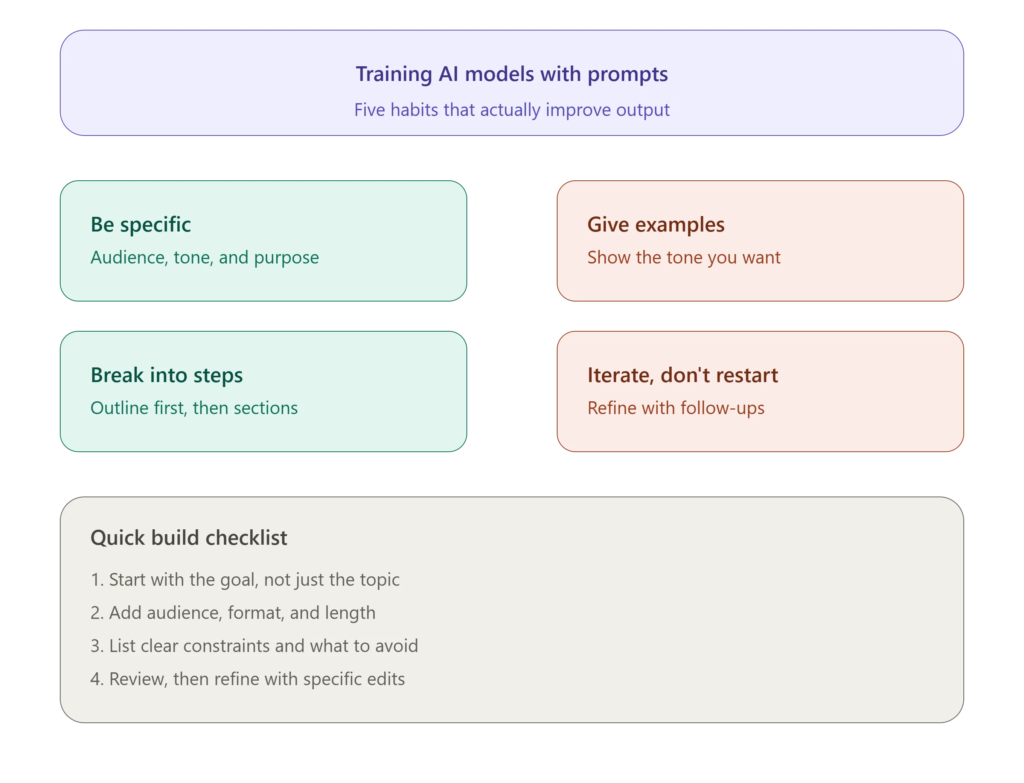
Set boundaries clearly. Word count, format, what to avoid. I once forgot to say “no bullet points” for a piece that needed flowing paragraphs, and got back a listicle instead of an article. My fault, not the tool’s Best Practices for Prompt Training AI Models.
Ask it to explain its reasoning for anything technical or factual. When I’m using AI for something like comparing pricing plans or summarizing research, I ask it to show its reasoning briefly. This has caught a few wrong assumptions before they made it into something I sent to a client.
Iterate instead of starting over. If the first response is close but not right, I don’t delete everything and retype from scratch. I just say “make this more casual” or “cut this in half” or “add a specific example here.” The model remembers the context, so refining beats restarting almost every time.
Step by step: how I actually build a good prompt now
- Start with the goal, not the topic. Instead of “write about email marketing,” I think about what I actually need — a beginner’s guide, a persuasive pitch, a checklist someone can follow today.
- Add the audience. Who’s reading this, and what do they already know? A prompt for total beginners should read differently than one for experienced marketers.
- Set the format. Paragraph, list, table, dialogue, whatever fits. Say it directly instead of assuming the AI will guess correctly.
- Give a length range. “Around 200 words” works better than no guidance at all, since the model otherwise tends to either ramble or cut things too short.
- Add constraints. Anything you specifically don’t want — no jargon, no exclamation points, no mention of a competitor, whatever matters for your situation.
- Include an example if tone is tricky. Even two sentences of your own writing helps more than a long description of “make it sound friendly.”
- Review and refine. Read the output critically, then give a specific follow-up instruction rather than rewriting the whole prompt from zero.
A real example that surprised me
I was helping a friend write a bio for her freelance photography website. First prompt was way too vague, and the result read like every other stock “passionate photographer capturing life’s moments” bio you’ve seen a hundred times.
So we tried again, giving actual details: she shoots mostly weddings in coastal towns, started after quitting a corporate job, and wants the bio to sound warm but confident, not overly formal. We also gave it one paragraph she’d written herself years ago as a tone reference.
The second version actually sounded like her. Small mentions of the coastal setting, a light nod to the career change, none of the generic “capturing life’s moments” filler. That was the moment it clicked for me how much specificity changes the output, way more than picking a “better” AI tool ainexttop ever would.
Common mistakes to avoid
- Being too vague and blaming the tool afterward. Vague input almost always means vague output, regardless of which AI you’re using.
- Overloading one prompt with ten different requests. I’ve done this and gotten a jumbled response that half-answers everything. Breaking a big ask into smaller steps usually works better.
- Not giving format instructions. If you need a table, say table. If you need short paragraphs, say that too. The model isn’t reading your mind.
- Assuming the first response is final. The best results almost always come after one or two rounds of refinement, not the very first try.
- Forgetting to fact-check anything specific. AI tools can sound completely confident while being wrong about a date, a statistic, or a technical detail. I always double-check anything that matters before it goes out the door.
- Copy-pasting the exact same prompt across totally different tasks. What works for writing a caption won’t necessarily work for summarizing a report. Adjust the structure to match what you actually need.
Tools worth mentioning
I split my daily use across a few platforms depending on the task. Claude tends to be my go-to for longer writing and anything where tone matters a lot. ChatGPT is solid for quick brainstorming and fast iterations. Gemini has been useful when I need something pulled together with current web info baked in. None of them are magic, they just respond better or worse depending on how clearly you set up the ask.
Final thoughts – Best Practices for Prompt Training AI Models
None of this is complicated once it clicks, but it took me an embarrassing number of bad drafts to actually internalize it. The tools aren’t reading your mind, and they’re not going to guess the specific outcome you had in your head unless you actually describe it.
If you’re getting flat, generic responses right now, it’s probably not the model’s fault. Try adding one more layer of detail to your next prompt, audience, tone, format, whatever you left out, and see what changes. That one small habit is basically the entire difference between mediocre AI output and stuff you’d actually want to use.

Hamad Arshad
SEO Specialist | SEO Manager | GEO Strategist
7+ Years of Experience in SEO, GEO, AEO, AI SEO, Local SEO, Technical SEO, PPC, Google Ads & Meta Ads.







Leave a Reply