
Cheapest AI Tools in 2026 That Actually Work
Three months ago I was paying for four different AI subscriptions at once. ChatGPT Plus, Claude Pro, a random image generator I forgot to cancel, and a “productivity AI” app that basically just wrapped GPT-4o in a prettier interface and charged me double for it.
That’s $70+ a month for tools I used maybe three times a week. When my card statement showed up, I finally sat down and asked myself: do I actually need all of this, or have I just been lazy about checking what’s free, what’s cheap, and what’s genuinely overpriced?
Turns out, 2026 has been a really good year to ask that question. AI pricing has quietly gotten a lot more competitive, and there are now solid budget options that didn’t exist a year ago. I cancelled two subscriptions, downgraded one, and I’m honestly getting more done than before. Here’s everything I found out the hard way.
Why AI got cheaper this year
If you’ve been paying attention to tech news, you’ve probably noticed the AI price war heating up. Cheaper models from providers like DeepSeek forced the bigger names to compete harder on price, and that pressure trickled down into consumer plans too.
The clearest sign of this: OpenAI rolled out a budget “Go” tier that sits well below the usual $20/month plan, and several other companies followed with similar lower-cost entry points. Meanwhile, on the developer side, API pricing for capable models has dropped so far that <cite index=”10-3″>the median cost per million input tokens across all commercial models fell from roughly $5.00 in early 2024 to under $1.00 by April 2026</cite>. That’s not a small dip. That’s the AI industry basically admitting the old prices were inflated.
None of that matters much if you’re just a regular person trying to write emails faster or clean up a spreadsheet, though. So let’s get into what’s actually worth paying for.
The free tools I use every single day
Before spending a dollar, know this: the free tiers in 2026 are genuinely usable, not just teaser versions designed to frustrate you into upgrading.
ChatGPT Free, Claude Free, and Gemini Free all still exist and all still work for everyday tasks drafting a message, summarizing an article, brainstorming ideas, basic coding help. If you’re not a power user, you might not need to pay for anything at all.
The catch with ChatGPT’s free tier specifically is the daily cap. From what I’ve seen and what other users report, you’re looking at somewhere around 10 messages a day on the standard model, plus a fairly short context window, so it can’t handle long documents well. Fine for quick questions, frustrating if you’re trying to work through something meaty.
Perplexity’s free plan is the one I recommend to almost everyone who asks me about research tools. It handles web-connected questions the “what’s the latest on X” type queries better than most paid tools, and you don’t need a card on file to use it.
The step-by-step way I picked my paid tools
I didn’t just grab whatever looked shiny. Here’s the process I actually used, and I’d suggest you do the same before subscribing to anything:
Step 1: Track what you actually do with AI for one week. Before paying for anything, keep a note of every time you open an AI tool and what for. I was shocked to see 80% of my usage was just “rewrite this email” and “explain this error message.” I didn’t need a $20/month tool for that.
Step 2: Match the task to the tier, not the hype. Writing and quick chat? A budget tier is fine. Long documents or serious coding work? You’ll want a mid-tier plan with a bigger context window.
Step 3: Check if a bundle beats separate subscriptions. This one saved me the most money. Instead of paying for ChatGPT Plus and Claude Pro separately, I switched to a multi-model bundle app. You lose a little bit of the “native” feel of each individual app, but you gain access to several models through one login, often for less than a single premium subscription alone.
Step 4: Read the fine print on “free” tiers before committing to paid. Some budget plans include ads or restrict you to one model family. That’s not necessarily bad, but know it going in.
Step 5: Cancel the trial before it renews. Actually do it. I know, obvious advice. But I forgot to cancel a Leonardo AI trial for two months straight because I told myself I’d “get around to it.” Set a calendar reminder the day you sign up, not the day before renewal.
Tools that surprised me (in a good way)
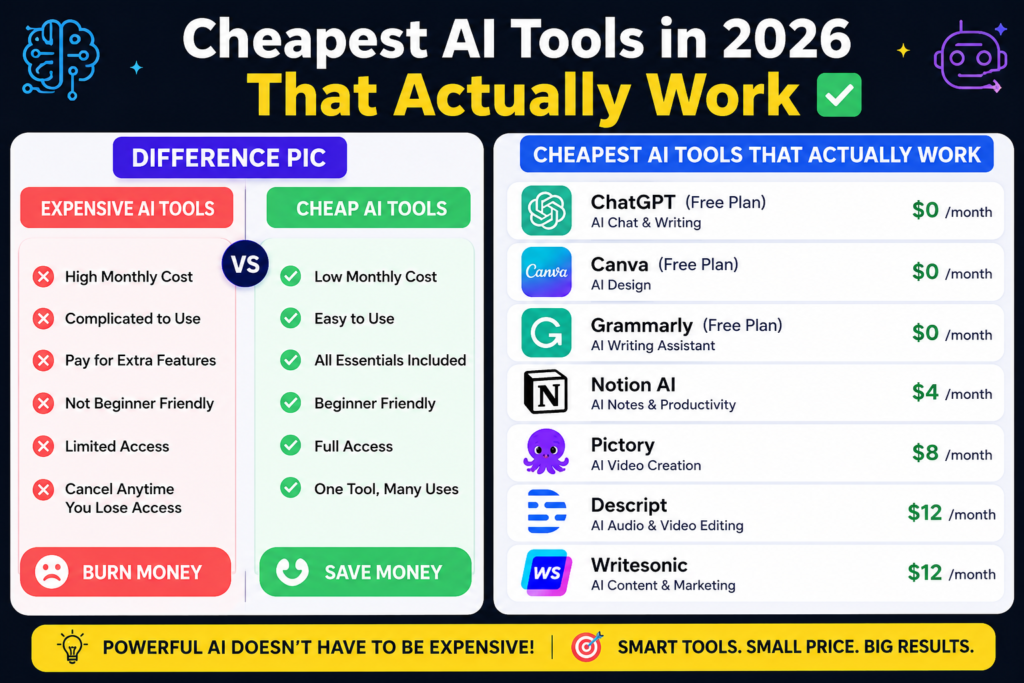
ChatGPT Go ($8/month) This is the plan I didn’t expect to like. It unlocks voice conversations, basic data analysis, and custom GPTs without jumping straight to the $20 Plus tier. The tradeoff is it shows ads and only gives you GPT models, no Claude or Gemini access. If you’re already loyal to OpenAI’s models, it’s a genuinely good deal.
Multi-model bundle apps (roughly $9–17/month) A few of these popped up over the past year that let you access GPT, Claude, and Gemini-family models through a single subscription, sometimes cheaper than any single premium plan on its own. If you’re someone who likes comparing answers across models (I do this constantly for anything important, like drafting a contract clause), this is a much better deal than paying for two or three apps separately.
DeepSeek’s web chat (free) I was skeptical going in, mostly because of all the noise around it last year. But for straightforward tasks like explaining code or summarizing text, it holds up fine, and it costs nothing. If you’re a developer and want to go further, DeepSeek’s API pricing is genuinely one of the cheapest ways to get frontier-level output for high-volume tasks.
Gemini’s bundled storage angle If you’re already a heavy Google Drive user, Gemini’s paid tier effectively pays for itself through the bundled cloud storage you get alongside it. I didn’t realize this until a friend pointed it out she was already going to pay for extra Drive storage anyway, so the AI features came along basically free.
Mistakes I made (so you don’t have to)
Mistake #1: I paid for “deep research” features I barely used. Some premium plans throttle their fanciest features like deep research modes much more than advertised. I paid full price assuming I’d get heavy usage out of it, then found out later it was capped at a handful of uses per week. Read the usage limits before assuming a feature is unlimited just because it’s on a paid plan.
Mistake #2: I assumed cheaper always meant worse. Not true anymore. Some of the lower-cost models handle everyday writing and coding tasks just as well as the expensive ones. The performance gap has narrowed a lot for typical use cases; it only really widens on complex, multi-step reasoning tasks.
Mistake #3: I kept three tools that did the exact same thing. It’s easy to accumulate subscriptions because each one felt useful in isolation. But when I actually compared outputs side by side for a week, two of them were basically interchangeable. Don’t be afraid to run a head-to-head test before committing long-term.
Mistake #4: I ignored the per-use cost for occasional tasks. If you only need image generation once a month, a $10/month subscription is a waste. Pay-as-you-go credits or a free tier with limited generations will usually work out cheaper for occasional needs.
So what should you actually pick?
If you’re a casual user who wants help with everyday writing, start with the free tiers. Seriously, don’t pay for anything yet. Use ChatGPT Free, Claude Free, or Perplexity Free for a couple of weeks and see if you even hit the limits.
If you outgrow that and want more flexibility without jumping to $20/month, look at the budget tiers ChatGPT Go or a bundled multi-model app are the two I’d recommend based on my own switch.
If you’re doing serious work long documents, coding, research that needs depth that’s when the $20/month standard tiers earn their price. Just pick based on what you actually do, not what’s trending on social media that week.
Final thought
The biggest shift I noticed this year isn’t that AI got smarter. It’s that AI got honest about pricing. There’s less pressure to pay for the flashiest plan, because the cheap and free options finally do enough of what most people need. Check what you’re actually using before renewing anything, and you’ll probably find you can cut your AI bill in half without losing much at all.

Hamad Arshad
SEO Specialist | SEO Manager | GEO Strategist
7+ Years of Experience in SEO, GEO, AEO, AI SEO, Local SEO, Technical SEO, PPC, Google Ads & Meta Ads.






Leave a Reply