
AI Automation Tools With No Restrictions
Three months ago I was running email follow-ups, social media scheduling, and a bit of lead scraping for a small client through one of those popular no-code automation platforms. Everything was fine until the 15th of the month. That’s when I’d hit my task quota, get throttled, or find out that the one feature I actually needed custom code steps was locked behind the “Business” plan I couldn’t justify paying for.
So I went down a rabbit hole trying to find automation tools that didn’t box me in like that. Not tools that ignore ethics or safety (that’s a different conversation, and honestly a bad idea for anyone running a real business). I mean tools that don’t cap you at 100 tasks a month, don’t force you into their narrow workflow templates, and let you actually own your automation instead of renting it.
Here’s what I found, what worked, what wasted my time, and how you can set this up without repeating my mistakes.
What “no restrictions” actually means (and what it shouldn’t mean)
Before anything else, let’s be clear about this, because the phrase gets thrown around loosely.
Good “unrestricted” automation means:
- No arbitrary task or run limits that force upgrades
- Full access to custom code (Python, JavaScript) instead of just drag-and-drop blocks
- You can self-host it if you want, so nobody can shut off your access
- Open APIs you can connect to literally anything
It does NOT mean tools that skip safety checks, scrape data illegally, spam people, or generate harmful content. I learned this the hard way when I tested a “no-limits AI” tool that turned out to be a thin wrapper with zero content moderation it started generating outreach messages that were borderline deceptive, and I had to manually rewrite half of them before sending. Cheap workaround, expensive cleanup. Not worth it.
So everything below is genuinely open, flexible, and low-restriction not reckless.
The tools I actually landed on
1. n8n (self-hosted)
This was the big unlock for me. n8n is an open-source automation platform, basically the Zapier alternative that lets you host it yourself on a $5/month VPS (I use one from Hetzner).
Once it’s self-hosted, there’s no task limit. None. I’ve run automations that fire off thousands of times a day and never see a paywall pop up.
Step-by-step for how I set mine up:
- Rented a small VPS (DigitalOcean or Hetzner both work fine)
- Installed Docker, then ran n8n’s official Docker image
- Pointed a subdomain at it and set up basic auth so it’s not wide open
- Connected it to Gmail, Google Sheets, and OpenAI’s API using their built-in nodes
The learning curve is real for the first week. I broke a workflow twice because I didn’t understand how n8n handles JSON between nodes. But once it clicked, I was building things Zapier straight up doesn’t allow on its cheaper tiers, like multi-branch conditional logic and custom JavaScript functions mid-workflow.
2. Ollama for local AI tasks
For anything text-related that didn’t need the absolute smartest model, I stopped hitting APIs entirely and started running models locally with Ollama. Llama 3 and Mistral run fine on a decent laptop.
Why this mattered: no rate limits, no per-token billing anxiety, and no worrying about a platform changing its usage policy overnight. I use it for drafting first-pass email replies and summarizing scraped data before a human (me) reviews it.
Downside and I want to be honest here local models are noticeably weaker at nuanced writing than GPT-4 class models. I don’t use them for anything client-facing without editing first.
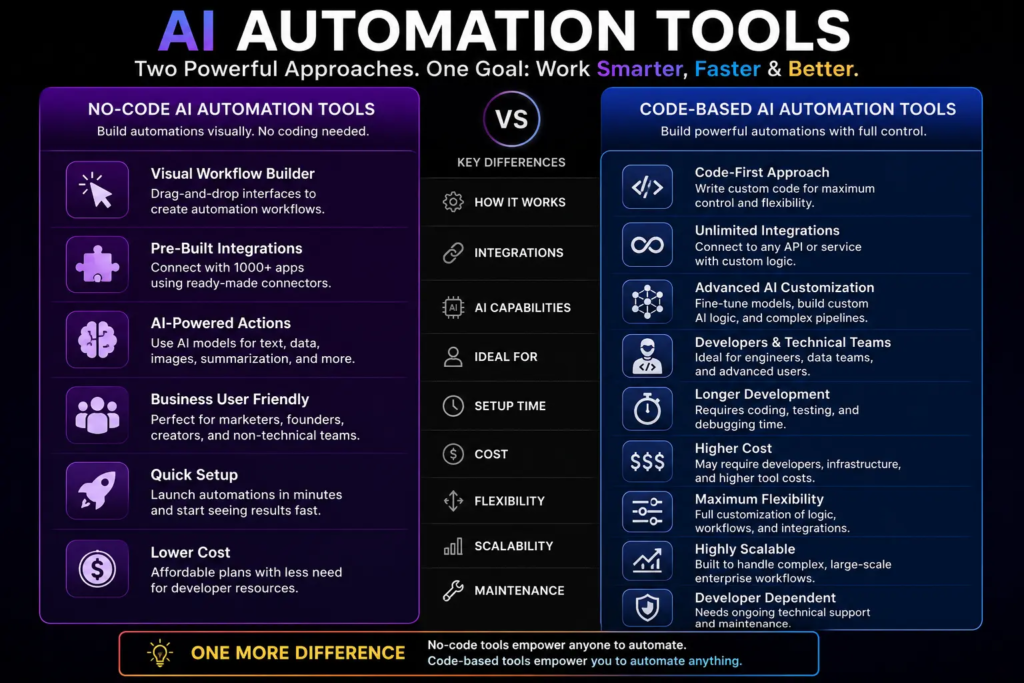
3. Make (formerly Integromat) for the visual stuff
I still keep one paid tool in the mix. Make’s free and starter tiers are genuinely more generous than Zapier’s, and the visual workflow builder handles branching logic way better. I use it for anything where I want a client to be able to look at the automation and actually understand what’s happening n8n’s flexibility comes at the cost of being less “pretty” for non-technical eyes.
4. OpenAI API directly (not through a middleman)
This one sounds obvious but it took me embarrassingly long to figure out. A lot of “AI automation” tools are just charging you a markup to hit the OpenAI or Anthropic API on your behalf, with their own rate limits stacked on top of the provider’s.
Cutting out the middleman and calling the API directly through n8n’s HTTP request node or a simple Python script removed an entire layer of restrictions I didn’t even realize was there. You still pay OpenAI or Anthropic for usage, but there’s no arbitrary “you’ve used your 50 AI credits this month” wall.
Mistakes I made so you don’t have to
I over-automated too fast. In my first two weeks with n8n, I tried to automate an entire client’s lead pipeline in one go. It broke silently, and I didn’t catch it for four days because I hadn’t built in any error notifications. Lesson: always wire up a Slack or email alert for failed workflow runs before you trust an automation to run unattended.
I ignored API costs until the bill came. Self-hosting the automation platform is free-ish, but the AI calls themselves aren’t. I ran a scraping-and-summarizing workflow overnight that called GPT4 way more than I expected and woke up to a $40 surprise. Now I always test with a cheaper model first (GPT4o mini or a local Ollama model) before switching to the expensive one for production.
I trusted a “no restriction” AI tool without checking what that actually meant . Mentioned this above, but it’s worth repeating. If a tool advertises zero restrictions and zero moderation as its main selling point, ask yourself why. Usually it means nobody’s checking the output quality either.
I didn’t back up my workflows. n8n stores everything in a database on your server. I didn’t set up automated backups for the first month, and when I fat-fingered a Docker command, I lost two workflows I had to rebuild from memory. Set up a daily backup cron job on day one, not day thirty.
A simple use case that actually saved me time
Here’s a concrete one, not theory. I built a workflow that:
- Watches a Google Sheet for new rows (new leads coming from a form)
- Sends the lead’s info to a local Ollama model to draft a personalized first-touch email
- Drops that draft into a separate sheet tab for me to review
- Once I mark it “approved,” it sends automatically through Gmail’s API
No per-task fees, no monthly cap, and I can tweak any step without asking a platform’s permission or waiting for a feature request to get approved. That workflow alone saves me close to three hours a week.
Common mistakes people make when chasing “no restrictions”
- Assuming self-hosted means zero cost you’re paying in server fees and your own time instead of a subscription
- Skipping security basics because “it’s just automation” an exposed n8n instance with no auth is a real risk
- Confusing “unrestricted” with “unmoderated” and ending up with sloppy or risky outputs
- Not testing workflows with small batches before scaling up
- Forgetting that open tools mean you’re now your own tech support
Final thoughts
If you’re tired of platforms nickel-and-diming you for basic automation, going the self-hosted, open-source route genuinely changes how you work. It’s more setup effort upfront, no doubt about that. But once it’s running, you stop thinking about limits and start thinking about what you actually want to build.
Start small. Get n8n running on a cheap VPS, connect one simple workflow, and let it run for a week before you add anything else. That’s how I’d do it again if I were starting today.

Hamad Arshad
SEO Specialist | SEO Manager | GEO Strategist
7+ Years of Experience in SEO, GEO, AEO, AI SEO, Local SEO, Technical SEO, PPC, Google Ads & Meta Ads.






Leave a Reply