
Why Choose ZipTie AI Search Analytics? Here’s What Changed My Mind About It
I’ll be honest I ignored AI search analytics for way longer than I should have.
Every SEO group I’m in was suddenly talking about “AI Overviews this” and “ChatGPT citations that,” and my first reaction was: cool, another shiny metric nobody actually needs. I had Google Search Console, I had my rank tracker, I had years of data. What more was there to know?
Then one of my own reports made me eat my words.
I was pulling together a monthly performance summary for a client’s laptop accessories site. Clicks were down. Impressions were down. But rankings for their main keywords hadn’t moved even a single position. Normally when that happens, I blame seasonality and move on. This time I got curious instead.
That curiosity is what led me to actually test ZipTie AI search analytics properly instead of just skimming articles about it. And a few weeks in, I understood exactly why so many SEO people had started recommending it.
The Question Search Console Can’t Answer
Here’s the thing nobody tells you when you’re deep in traditional SEO reporting: Google Search Console shows you clicks and impressions, but it has zero visibility into what’s happening the moment before a click — inside the AI-generated answer sitting at the top of the page.
If Google is generating an AI Overview for a search term and your competitor’s page gets quoted inside it, that click just… doesn’t happen. Not because you dropped in rankings. Because the searcher got their answer without scrolling down to the actual results at all.
That’s precisely what was happening to my client. Their keyword rankings looked stable, but the actual page views were quietly draining away into an AI answer box that was crediting somebody else.
Once I saw that pattern with my own eyes, “why choose ZipTie AI search analytics” stopped being a phrase I searched out of curiosity and became a genuine business question.
What ZipTie Actually Shows You (Beyond the Buzzwords)
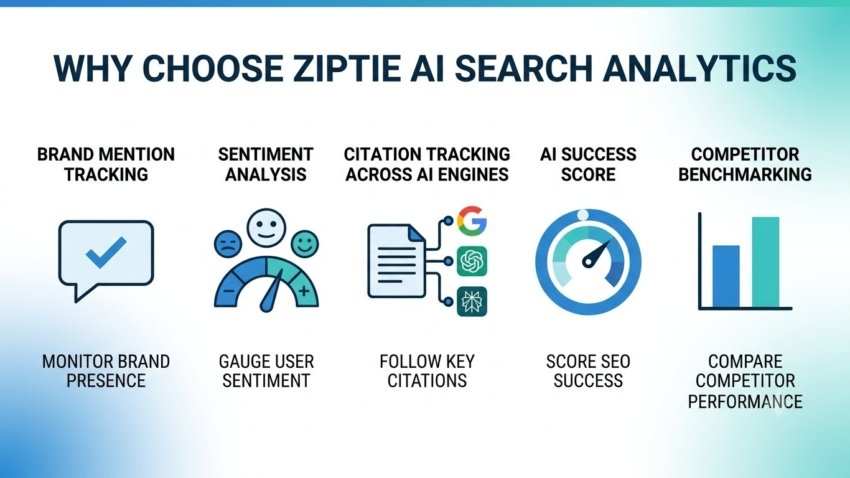
Strip away the sales page language, and ZipTie is really doing one specific job: watching how your brand shows up inside AI-generated answers across Google AI Overviews, ChatGPT, and Perplexity.
It’s tracking things I genuinely couldn’t get anywhere else:
- Whether your brand actually gets named inside an AI answer
- Whether that mention sounds positive, neutral, or negative
- Whether your website gets listed as a cited source
- How your visibility compares to your direct competitors on the same search terms
- The complete text of the AI-generated answer, word for word
- A full list of every domain the AI pulled information from
All of that rolls up into something called an AI Success Score for each query. Once I started sorting my dashboard by that score instead of just scrolling randomly, everything got a lot more useful, a lot faster.

The Detail That Made Me Actually Trust the Data
Most of the free or cheap AI-tracking tools I tried before this rely on API calls to guess whether an AI Overview exists for a keyword. The problem is those APIs miss a huge amount of what actually renders on a real screen.
ZipTie instead uses live browser sessions with real Google accounts, capturing exactly what a person searching would see — including a screenshot as proof. In testing published by the ZipTie team, this browser-based approach caught AI Overviews on roughly 28% of tracked keywords, while some API-based competitors only caught around 1.6% of that same set.
That gap is the reason I stopped questioning the data and started acting on it. When a tool tells you “no AI Overview here” and you can literally open Google yourself and see one sitting right there, you stop trusting the tool. ZipTie didn’t do that to me.
How I Set It Up (Step by Step, Mistakes Included)
If you’re thinking about trying this yourself, here’s the process I landed on after some early trial and error.
Step 1: Link Google Search Console first. ZipTie uses your GSC history to suggest queries automatically. It’s a fast setup, but don’t expect magic if your site is new — more on that below.
Step 2: Don’t rely purely on auto-suggested queries. The AI assistant inside ZipTie generates a solid starter list, but it leans heavily toward exact-match search terms. I had to manually add the more conversational, long-tail phrases people actually type into ChatGPT, like full sentences rather than short keyword phrases.
Step 3: Sort by AI Success Score, not alphabetically. This was my first real mistake. I spent an entire afternoon scrolling through queries in whatever order they loaded instead of sorting by score. Sort low to high first — that’s where your biggest visibility gaps are hiding.
Step 4: Actually read the full AI response text. Don’t just glance at whether you’re mentioned. Read what the AI is saying about you and your competitors word for word. This is where the real content gaps show up.
Step 5: Follow the optimization guidance, but interpret it. ZipTie tells you whether a query needs more brand mentions or more citations from other sources. Those require completely different fixes, so don’t treat the recommendation as a checkbox — actually think through what content change would address it.
Step 6: Wait before judging results. AI-generated answers don’t refresh instantly after you publish new content. I made the mistake of checking again after three days and assuming nothing worked. Give it two to three weeks minimum.
A Real Example From My Own Reporting
For that same laptop accessories client, one query around “best docking station for dual monitor setup” was generating a Google AI answer that cited two competitor pages, both of which had detailed compatibility tables listing specific ports and monitor resolutions supported.
My client’s existing page had general descriptions instead — nice writing, no hard specs. Once I rebuilt the page with an actual compatibility table listing real model numbers and supported resolutions, that query started showing my client’s domain among the cited sources within about three weeks.
It wasn’t an overnight miracle. But it was a clear, traceable result that I could point to in a client report, which is more than I could say before I had this kind of visibility.
Common Mistakes People Make With This Tool (I Made Most of Them)
Treating it like a replacement for Ahrefs or SEMrush. It isn’t one. It’s an added layer for a specific problem — AI-generated answers — not a full SEO suite.
Ignoring the credit-based pricing until it runs out. The billing is based on credits rather than a flat unlimited plan, and it’s easy to burn through your monthly allowance faster than expected if you’re checking obsessively. Plan your usage instead of refreshing constantly.
Assuming small or new sites will get the same auto-generated query list as established ones. Because ZipTie leans on Google Search Console data, thinner GSC history means thinner auto-suggestions. You’ll need to manually build your query list for newer domains.
Expecting the tool to fix content for you. It diagnoses the gap and tells you what’s missing. It does not write, publish, or optimize the page itself. That part is still on you or your content team.
So, Why Choose ZipTie AI Search Analytics?
Because it answers a question your existing SEO stack simply cannot answer: when an AI engine talks about your industry, does it mention you, and if so, what is it actually saying?
If your business depends on organic search visibility and you’ve noticed traffic softening even while rankings hold steady, that’s usually a sign worth investigating rather than ignoring. I know, because I nearly ignored it myself.
It won’t replace your existing SEO tools, and it doesn’t cover every AI platform out there yet. But for the specific job of understanding AI Overview, ChatGPT, and Perplexity visibility with real accuracy, it’s the first tool that gave me data I could actually trust enough to act on — and that’s ultimately what changed my mind.

Hamad Arshad
SEO Specialist | SEO Manager | GEO Strategist
7+ Years of Experience in SEO, GEO, AEO, AI SEO, Local SEO, Technical SEO, PPC, Google Ads & Meta Ads.






Leave a Reply