
Is NotebookLM Free? Here’s What I Learned After Actually Hitting Its Limits
I didn’t plan on becoming a NotebookLM power user. It just kind of happened while I was drowning in research documents for a client project.
I had about 40 PDFs, a pile of messy notes, and a deadline that wasn’t moving. Someone in a marketing Slack group mentioned NotebookLM as a way to dump all your sources in one place and just ask questions instead of scrolling through everything manually. I figured, sure, why not, it’s free anyway.
Except a few weeks later I hit a wall I didn’t expect, and that’s when I actually had to sit down and figure out what “free” really means with this tool, and whether upgrading was worth it. Spoiler: the pricing situation changed recently, and a lot of articles floating around online are already outdated because of it.
What the Free Plan Actually Gives You
Here’s the part that surprised me — the free version of NotebookLM is genuinely usable, not a stripped-down teaser version like a lot of “free” AI tools pretend to be.
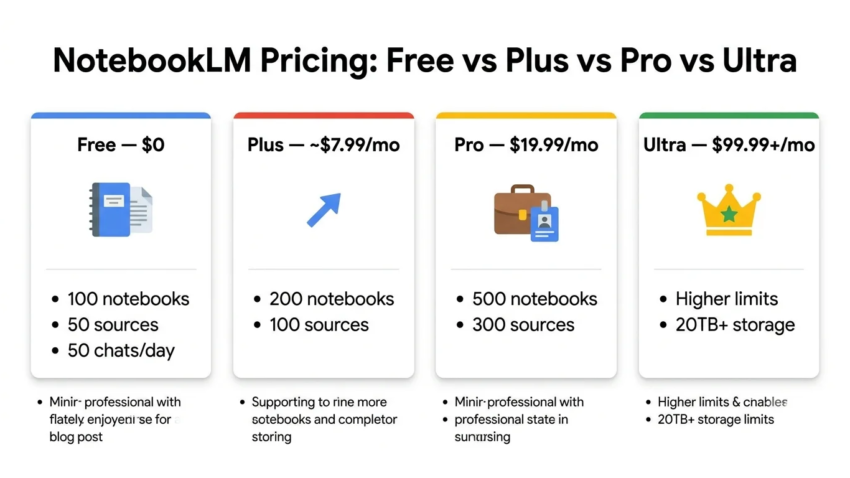
With a regular Google account, you get access to up to 100 notebooks, with a cap of 50 sources per notebook, and around 50 chat questions a day. No credit card, no trial countdown, no forced upgrade nag screen every five minutes.
You also get the features that actually make the tool worth using: Audio Overviews (the podcast-style summaries that got NotebookLM famous), Video Overviews, mind maps, quizzes, flashcards, and even Deep Research for pulling info from across the web alongside your own uploaded sources.
For a solo researcher, student, or someone organizing notes for a handful of projects, that’s genuinely enough. I didn’t hit the ceiling until I started running multiple large projects side by side.
Where I Actually Hit the Wall
My first real “oh, I need to upgrade” moment came when I tried to load a huge combined research folder into a single notebook — think dozens of long PDFs, some scanned reports, a handful of transcripts. I blew past the 50-source cap on that one notebook pretty quickly.
My second mistake was assuming I could just paste in one massive document instead. NotebookLM caps each individual source file at 500,000 words or 200MB, whichever hits first, and that limit doesn’t change no matter which plan you’re on — free, Plus, Pro, or Ultra. I had to split my biggest file into two separate uploads before it would even process it.
That’s when I actually went looking at the paid tiers properly, and that’s where things got confusing fast.
The Pricing Confusion Nobody Warns You About
If you Google “NotebookLM pricing” right now, you’ll find a mess of conflicting numbers, and it’s not because bloggers are careless. Google actually restructured the whole thing at its I/O event in May 2026, folding NotebookLM’s paid tiers directly into the broader Google AI subscription plans instead of selling it as its own product.
Before that restructure, a lot of guides described the $19.99 plan as “NotebookLM Plus.” That’s now outdated. Here’s the current lineup as I understand it after digging through it myself:
- Free — $0, no bundled subscription needed
- Plus — bundled with Google AI Plus, around $4.99–$7.99/month depending on region and current promotions
- Pro — bundled with Google AI Pro, $19.99/month (or a discounted $9.99/month if you’re a US student with a valid .edu email)
- Ultra — bundled with Google AI Ultra, starting around $99.99/month, with a higher-capacity tier above that for heavy team use
There is no way to buy “NotebookLM Plus” or “NotebookLM Pro” as a standalone purchase anymore. You’re actually subscribing to Google’s broader AI plan, and NotebookLM’s higher limits just come along for the ride, alongside things like extra cloud storage, Gemini access in Gmail and Docs, and video generation tools through Flow.
Step-by-Step: How I Figured Out Which Plan Actually Made Sense
If you’re trying to decide whether to pay for anything, here’s roughly how I worked through it myself.
Step 1: Track how often you actually hit the free limits. Don’t guess. For about two weeks, I paid attention to how often I ran out of daily chats or bumped against the 50-source cap. If it’s rare, stay free. If it’s a weekly headache, that’s a real signal.

Step 2: Check if you already have a bundled Google AI plan. If you’re already paying for Google AI Pro or Google One with AI features for other reasons — Gemini in Docs, extra Drive storage, whatever — you may already have NotebookLM’s higher limits unlocked without paying anything extra. I almost paid for something I technically already had access to.
Step 3: Look at the student discount if it applies to you. If you’re a student with a .edu email, the Pro-tier pricing drops to roughly half price. That’s a genuinely good deal if you’re doing heavy academic research and need the higher source and Deep Research caps.
Step 4: Split large files instead of assuming a paid plan fixes size limits. This one tripped me up initially. Upgrading doesn’t raise the per-source size cap. If your file is too big, you need to split it regardless of which plan you’re on.
Step 5: Reassess after finishing a big project, not during one. I initially considered upgrading mid-project out of frustration. In hindsight, waiting until the project wrapped and reviewing my actual usage numbers gave me a much clearer picture of whether I needed Plus, Pro, or nothing at all.
A Real Example From My Own Workflow
For that 40-document research project, I ended up splitting the material across three separate notebooks instead of paying for a higher tier right away — one for background research, one for competitor analysis, one for raw interview transcripts.
That workaround alone solved most of my source-limit frustration without spending a cent. I only ended up upgrading a month later, and only because I started running Deep Research sessions daily across multiple client projects, and the free tier’s daily cap on those genuinely slowed me down.
If your usage looks more like occasional research bursts rather than daily heavy use, you might never need to pay at all.
Common Mistakes People Make With NotebookLM Pricing
Trusting older articles blindly. Because of the May 2026 restructure, a lot of guides published earlier this year describe pricing and tier names that no longer match reality. Always check the publish date on anything you’re reading about this.
Assuming a higher plan fixes the source size cap. It doesn’t. That 500,000-word/200MB ceiling per file applies across every tier, free through the top Ultra plan.
Forgetting there’s no offline mode. NotebookLM processes everything through Google’s servers and needs an internet connection to work, on every plan. If you’re dealing with sensitive or confidential documents, that’s worth factoring into your decision before you upload anything.
Paying for Pro when Plus would’ve covered it. The jump from Plus to Pro is a big price increase for limits that most casual and even moderately heavy users never actually max out. Track your real usage before jumping straight to the priciest tier.
So, Is NotebookLM Actually Worth Paying For?
Honestly, for most people the free plan is more than enough, and that surprised me given how capable the tool actually is. It only really starts making sense to pay once you’re running multiple large projects at once, hitting daily chat or source caps regularly, or relying heavily on Deep Research as part of your actual workflow.
If you’re already unsure whether you need to upgrade, my honest advice is the same thing I wish someone had told me earlier: use the free version properly for a few weeks first, actually notice where it slows you down, and only then decide if paying makes sense for how you personally work.

Hamad Arshad
SEO Specialist | SEO Manager | GEO Strategist
7+ Years of Experience in SEO, GEO, AEO, AI SEO, Local SEO, Technical SEO, PPC, Google Ads & Meta Ads.








Leave a Reply