
What Are The Best AI Search Monitoring Tools? Here’s What I Learned After Testing a Handful of Them
I run content and SEO for a few different clients, and for years my Monday morning routine looked the same: open Search Console, check rankings, check clicks, move on with my day. Boring, predictable, reliable.
Then one Monday, a client’s traffic dipped for no reason I could explain. Rankings hadn’t moved. Impressions were basically flat. But clicks were down almost 20%.
I spent two days convinced something was broken in my tracking setup. Turns out nothing was broken — Google was just answering the search query directly inside an AI Overview, and a competitor’s page was the one being quoted in it. My client’s page was still ranking fine. It just wasn’t getting seen anymore.
That was the moment I stopped treating “AI search monitoring” as some future trend and started actually testing tools built for it. I write about tools like this pretty regularly over at ainexttop, so I went in with a “let’s actually use these properly” mindset instead of just skimming feature lists.
Here’s what I found, what surprised me, and a couple of mistakes I made along the way.
Why This Is a Different Job Than Regular Rank Tracking
Before jumping into specific tools, it’s worth being clear on why your old SEO stack can’t do this job on its own.
Traditional rank tracking measures a fixed position — you’re either #3 or you’re not. AI-generated answers don’t work that way. The same question asked twice can pull a different answer, cite different sources, or leave your brand out entirely depending on phrasing, location, or which model version answered it.
So instead of asking “where do I rank,” AI search monitoring tools are built to answer three different questions: Are you showing up in AI-generated answers at all? Are you actually being cited as a source? And what should you change to fix it if you’re not?
That’s a genuinely different discipline, and it’s why a whole new category of tools has popped up around it in the last year or so.
The Tools I Actually Tried (And What Stood Out)
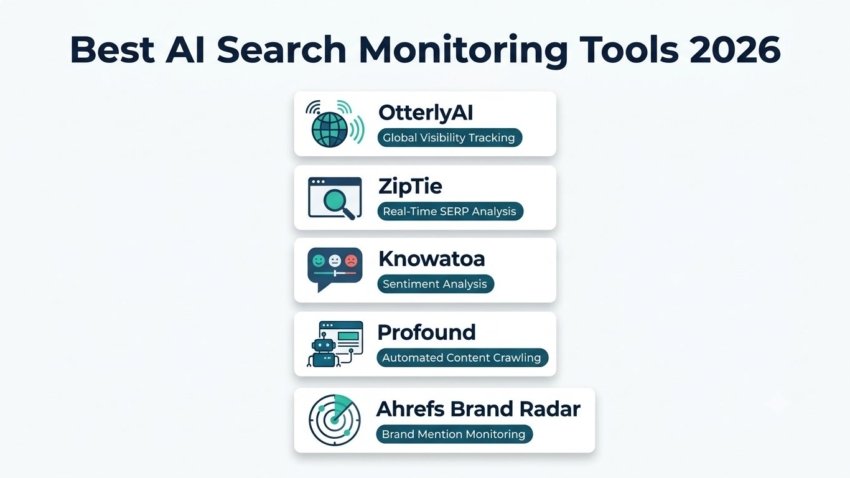
OtterlyAI This was the first one I tested, mostly because it kept coming up as the most established option in the space. It tracks visibility across a wide range of engines — Google AI Overviews, AI Mode, ChatGPT, Gemini, Copilot, and Perplexity — which is a broader spread than most competitors offer. What impressed me most was the country-level tracking. A lot of tools give you one global number and call it a day. OtterlyAI let me see how a client’s visibility differed between US and UK results, which mattered a lot since one of my clients sells almost exclusively to a UK audience.
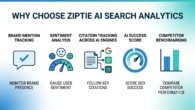
ZipTie I’ve written about this one in more depth elsewhere, but the short version is that it focuses specifically on Google AI Overviews, ChatGPT, and Perplexity, using real browser sessions instead of API guesswork to detect AI Overviews. That browser-based approach caught noticeably more AI Overviews in testing than API-reliant tools, which matters a lot when you’re trying to trust the data enough to act on it.
Knowatoa This one leans heavily into sentiment and tone analysis rather than just counting mentions. If you care less about “am I mentioned” and more about “what is the AI actually saying about me,” this is worth a look. There’s a bit of a learning curve with some of the deeper sentiment and keyword features, and I’ll admit I didn’t fully explore everything it offers, but the core analysis felt genuinely useful rather than surface-level.
Profound This one felt built for bigger teams and agencies. It covers 10+ AI engines and includes something called Agent Analytics, which tracks how AI crawlers and bots are actually interacting with your site before your content ever shows up in an answer. That’s a layer most tools skip entirely — it’s less about the output and more about whether your content is even reachable by these systems in the first place.
Ahrefs Brand Radar If you’re already paying for Ahrefs, this is worth checking simply because it sits inside a tool you probably already use daily. That said, it requires a fairly high base plan to unlock, which makes it a harder recommendation for smaller sites or solo operators compared to some of the standalone options.

Step-by-Step: How I Actually Set These Up
If you’re starting from zero, here’s roughly the process I followed across most of these tools.
Step 1: Build a real query list, not a guessed one. Don’t just monitor your main keywords. Pull the actual conversational questions your customers would type into ChatGPT — full sentences, not fragments. I pulled a lot of mine from actual customer support questions and reviews.
Step 2: Check engine coverage before committing. Some tools only track three engines, others track ten. Match this to where your actual audience searches. If your customers mostly use Google, don’t overpay for deep Claude or Grok coverage you’ll never look at.
Step 3: Look for citation data, not just mention counts. Being mentioned by an AI engine and being cited as a clickable source are two very different outcomes. Prioritize tools that clearly separate the two.
Step 4: Set a baseline before making content changes. I made the mistake of tweaking a client’s page and checking results two days later. AI answers don’t refresh instantly — give it at least two to three weeks before judging whether a content change actually worked.
Step 5: Compare against competitors, not just your own history. A flat visibility score means nothing without context. Most of these tools include competitor benchmarking — use it. Seeing that a competitor jumped from zero citations to three in a month tells you a lot more than watching your own number in isolation.
A Real Example From My Own Work
For one client in a fairly competitive niche, I ran the same set of ten queries across two different monitoring tools just to see how much the results would differ. The overlap was maybe 60%. One tool caught an AI Overview appearance the other completely missed.
That was a useful lesson on its own: no single tool sees everything. If a client’s AI visibility genuinely matters to their business, running two tools in parallel for a month or so, at least at the start, gives you a much more honest picture than trusting one dashboard blindly.
Common Mistakes to Avoid
Assuming more engines tracked automatically means a better tool. Coverage matters, but depth matters more. A tool that tracks three engines thoroughly with real citation data beats one that shallow-tracks ten.
Ignoring pricing structure until you’re locked in. Some of these tools use flat monthly pricing, others use credit systems that get eaten up fast if you’re checking obsessively. Know which model you’re signing up for before you commit.
Treating AI visibility data as a replacement for traditional SEO. It’s an addition, not a swap. You still need solid technical SEO, backlinks, and content quality — AI monitoring just adds a layer traditional tools can’t see.
Expecting instant results after content changes. This one bit me more than once. AI-generated answers take time to update. Patience matters here more than it does with regular rank tracking.
Final Thoughts
If your traffic ever dips while your rankings stay steady, that’s usually not a coincidence anymore — it’s often a sign your brand quietly disappeared from an AI-generated answer somewhere. None of the tools I tested are perfect on their own, and honestly, the space is moving fast enough that what’s “best” right now will probably shift again within a few months.
But having any real visibility into this — instead of flying blind like I was for that first confusing week — made a genuine difference in how I explain traffic changes to clients now. If you manage a website that depends on search traffic, it’s worth setting aside an afternoon to actually try one of these tools yourself rather than just reading about them.

Hamad Arshad
SEO Specialist | SEO Manager | GEO Strategist
7+ Years of Experience in SEO, GEO, AEO, AI SEO, Local SEO, Technical SEO, PPC, Google Ads & Meta Ads.





Leave a Reply