
IoT and Artificial Intelligence What Happened When I Actually Combined Them (Not Just Read About It)
My smart thermostat used to annoy me more than it helped me.
It would blast the AC at 2 PM because that’s what I’d told it to do weeks earlier, completely ignoring the fact that nobody was even home that day. It was “smart” in name only — just a timer with a nicer app. That mismatch between what these devices promise and what they actually deliver is what got me curious about IoT and AI together, instead of treating them as two separate buzzwords.
Turns out that gap has a name — people in the industry call it AIoT, short for Artificial Intelligence of Things — and once I actually started setting up systems where AI was reading and reacting to IoT sensor data instead of just following a static schedule, the difference was honestly bigger than I expected. I cover a lot of AI-focused topics over at ainexttop and this is one of those areas where the hands-on experience taught me a lot more than any explainer article did.
What IoT and AI Actually Look Like Together (Not the Textbook Version)
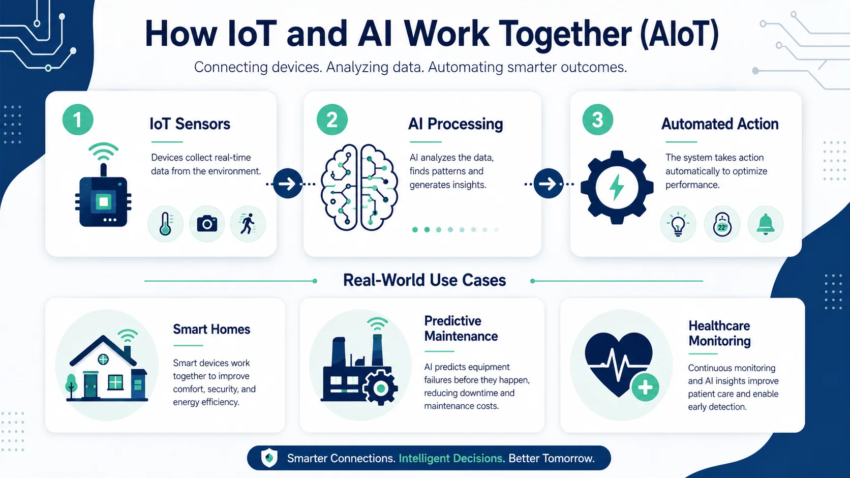
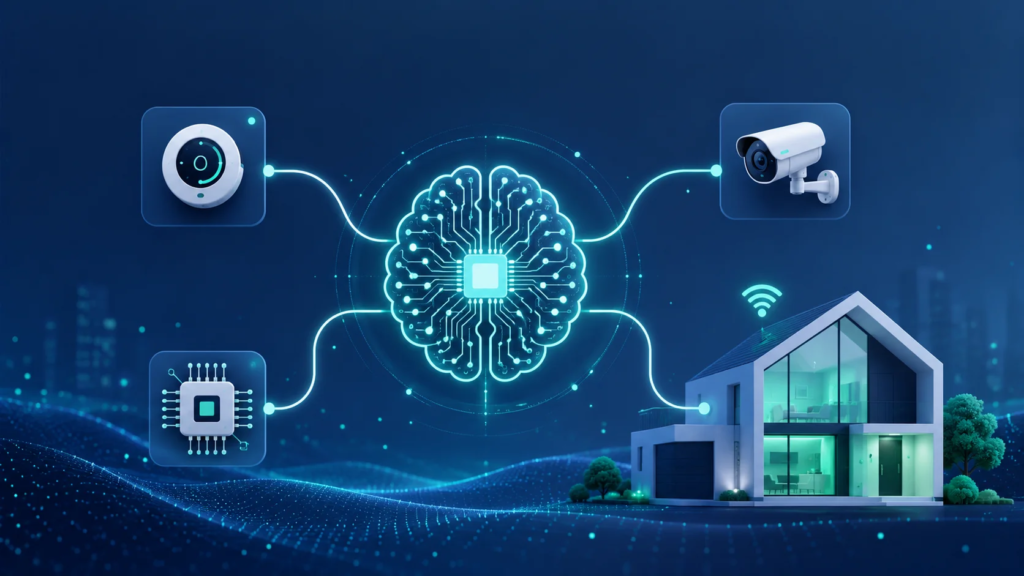
Here’s the simplest way I explain it to people who ask: IoT is the senses, AI is the brain.
IoT devices — sensors, cameras, smart plugs, wearables — collect data constantly. On their own, they’re just collecting numbers. A temperature sensor knows it’s 78 degrees. A motion sensor knows something moved. That’s it. No judgment, no context, no action beyond a pre-set rule.
AI is what turns that raw data into an actual decision. Instead of “turn on the AC at 2 PM every day,” an AI-driven system can learn that the room only actually needs cooling when someone’s present, adjust automatically based on real occupancy patterns, and even predict when you’ll be back before you walk in the door.
That shift — from reacting on a fixed schedule to reacting based on real, changing conditions — is the entire point of combining the two. Experts increasingly describe this as IoT moving from just observing an environment to actually acting on it intelligently.
Where I First Saw It Actually Work
The first place I noticed a real difference wasn’t in my house — it was helping a small client with a warehouse-style storage business.
They had temperature and humidity sensors scattered around their storage units, but someone had to manually check a dashboard every few hours to catch problems. Twice that year, a humidity spike had gone unnoticed overnight and damaged stored inventory before anyone caught it the next morning.
We connected those same sensors to a system that used AI to flag abnormal patterns automatically, instead of just logging raw numbers for a human to eyeball later. This is basically the predictive maintenance model that shows up constantly in AIoT case studies — manufacturers using similar sensor-plus-AI setups have reported downtime reductions of up to 50% by catching equipment problems before they became full failures.
For that client, it wasn’t downtime we were solving, it was inventory damage — but the underlying idea was identical: stop waiting for a human to notice a problem, and let the system flag it the moment the pattern looks wrong.
Step-by-Step: How I’d Actually Set Something Like This Up
If you’re thinking about combining IoT and AI for your own home, small business, or client project, here’s roughly the process that worked for me.
Step 1: Start with the data you already have.
Don’t buy a pile of new sensors first. Look at what you’re already collecting — smart plugs, existing security cameras, basic thermostats — and figure out what data is just sitting there unused. I was surprised how much I already had before adding a single new device.
Step 2: Define the actual decision you want automated.
Vague goals like “make my home smarter” go nowhere. Specific goals like “only cool the room when someone’s actually in it” or “flag humidity spikes before they cause damage” give you something concrete to build toward.
Step 3: Choose a platform that actually processes data locally when possible.
Edge computing — where devices process data on-site instead of sending everything to the cloud — matters more than people realize. It cuts down on lag and keeps basic functions working even if your internet drops. I learned this the hard way after a router outage left my entire “smart” setup completely dumb for an afternoon.
Step 4: Let it run before trusting it fully.
I made the mistake of trusting automated adjustments too early on that warehouse project. For the first two weeks, we ran the AI system in “alert only” mode — it flagged issues, but a person still confirmed before anything automatic happened. That caught a couple of false alarms before we let it act independently.
Step 5: Review and adjust the thresholds regularly.
What counts as “normal” shifts over time — seasons change, usage patterns change, equipment ages. I check in on threshold settings every few months rather than assuming a one-time setup is permanent.
A Real Example From My Own Home
After that client project, I redid my own thermostat setup properly instead of just relying on a fixed schedule. I paired it with a simple occupancy sensor and let a basic AI-driven automation rule handle the adjustments instead of a rigid timer.
The first week had a few awkward moments — one evening it decided nobody was home when I was very much sitting on the couch, just not moving much. But after it had enough data on my actual patterns, it stopped guessing and started genuinely predicting. My energy bill dropped noticeably the next two months, not dramatically, but enough that I actually noticed it on the statement.
Common Mistakes to Avoid
Treating IoT devices as “smart” just because they’re connected. Connectivity alone isn’t intelligence. A device that just follows a fixed schedule over WiFi isn’t meaningfully different from one following a schedule with a physical dial.
Skipping security considerations. IoT devices are a common target for attackers, and adding AI-driven automation on top means a compromised device can trigger real, automated actions — not just leak data. Basic steps like changing default passwords and keeping firmware updated matter more here than with a regular gadget.
Automating everything at once. I tried to automate too many systems simultaneously on that first warehouse project and ended up with conflicting alerts that were harder to interpret than the manual process we replaced. Start with one clear use case, get it working well, then expand.
Ignoring data quality. An AI system is only as good as the sensor data feeding it. A poorly placed or aging sensor feeding bad readings will produce confidently wrong decisions, which is worse than no automation at all.
Final Thoughts – IoT and Artificial Intelligence
Combining IoT and AI isn’t really about buying fancier gadgets — it’s about giving the data those gadgets already collect an actual brain to make decisions with, instead of leaving it sitting in a dashboard nobody checks regularly. Once I stopped thinking about IoT and AI as two separate trends and started treating them as one connected system, both my client’s warehouse problem and my own annoyingly dumb thermostat finally started making sense.
If you’re sitting on IoT devices that just follow fixed rules right now, that’s honestly the best starting point you could ask for. You don’t need to start from scratch — you just need to teach the data you already have to actually think.

Hamad Arshad
SEO Specialist | SEO Manager | GEO Strategist
7+ Years of Experience in SEO, GEO, AEO, AI SEO, Local SEO, Technical SEO, PPC, Google Ads & Meta Ads.






Leave a Reply