
Best AI Avatar Services for Virtual Product Launches: What Actually Worked When I Tested Them
A client came to me two weeks before a product launch with a problem I’ve heard more than once this year: the founder who was supposed to present the launch video had a scheduling conflict, no reshoot slot available, and a hard deadline that wasn’t moving.
My first suggestion — reschedule the launch — got a hard no. My second suggestion, half-joking, was “what if we just don’t use a real person on camera at all.” That joke turned into an actual experiment, and honestly, the result surprised me more than I expected going in.
I ended up testing a handful of AI avatar platforms over that stressful week, under real deadline pressure instead of casually browsing feature pages. I write about AI tools like this fairly often over at ainexttop, so here’s the honest version of what worked, what didn’t, and what I’d actually recommend if you’re facing a similar situation.
Why Product Launches Specifically Are a Different Job
Before getting into the tools, it’s worth being clear about why “AI avatar for a product launch” isn’t the same ask as “AI avatar for a random social clip.”
A launch video needs to look intentional. It’s often the first real impression a new product gets, sometimes in front of investors, press, or a launch-day audience watching live. That means lip-sync accuracy, natural gestures, and brand consistency actually matter here in a way they don’t for a quick throwaway Reel. A slightly off avatar on TikTok gets scrolled past. A slightly off avatar on your product’s launch page gets screenshotted and mocked.
So the bar for “good enough” is genuinely higher, and that shaped which tools actually made the cut for me.
The Tools That Actually Held Up Under Real Pressure
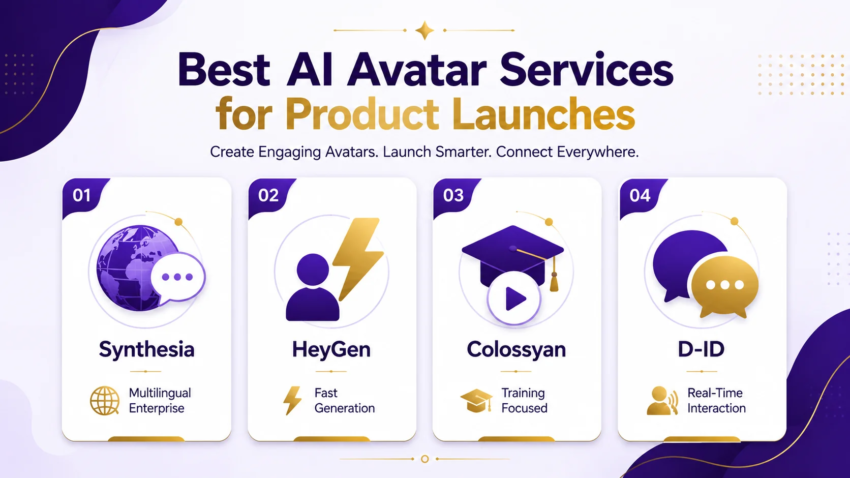
Synthesia This was the safest, most polished option of everything I tried, and it showed. It’s built around structured, managed business content — think onboarding videos, training modules, and yes, product launches — with support for 140+ languages and a huge base of enterprise users behind it. If your launch needs to go out in multiple languages for different regions at once, this is the strongest pick I tested. The trade-off is that it feels more corporate and less flexible than some of the faster, scrappier tools, which is exactly the point if that’s what you need.
HeyGen This became my actual pick for that specific rushed launch. It’s fast, the avatar library is huge (well over 200 avatars supporting 140+ languages as of its latest release), and the turnaround from script to finished clip was noticeably quicker than Synthesia. For a launch under real time pressure, speed mattered more than the slightly extra polish Synthesia offered, and HeyGen’s output quality was still genuinely presentable.
Colossyan I brought this in for a second client project that was less about a flashy public launch and more about internally training a sales team on a new product ahead of the public release. Colossyan leans specifically into training-focused content, and it showed — the interface nudges you toward structured, instructional pacing rather than punchy marketing energy. Good tool, wrong use case if you’re trying to hype a product publicly.
D-ID This one stood out for a completely different reason: real-time interaction. If your launch includes any kind of live Q&A element or an interactive demo booth where visitors can actually “talk” to an AI presenter, D-ID’s conversational agent setup handles that with genuinely low response lag. I didn’t need this for the launch video itself, but I’d absolutely reach for it if a client wanted an interactive launch experience instead of a straight pre-recorded video.
The Actual Step-by-Step Process I Used
Here’s roughly how that rushed launch project actually came together, in order.
Step 1: Write the script exactly like you’d brief a real presenter. I made the mistake early on of writing overly formal, stiff script lines because I subconsciously assumed “AI avatar” meant “write it robotically.” Wrong move. The more natural and conversational the script, the more natural the delivery came out. Short sentences, contractions, actual personality — it all translated better than I expected.
Step 2: Match the avatar to the brand, not just the “best looking” option. Every platform gives you a library of preset avatars, and it’s tempting to just pick whichever one looks the most polished. I picked one that actually matched the founder’s general energy and speaking style instead, since the video needed to feel consistent with how the founder normally communicates in other content.
Step 3: Generate in short segments, not one long take. Instead of one long five-minute script, I broke the launch video into four shorter segments — intro, problem, solution, call to action. Shorter segments meant faster regenerations when something needed a small fix, instead of re-rendering the entire video over one bad sentence.
Step 4: Review with sound on, at full attention, every single time. This sounds obvious, but under deadline pressure it’s the step people skip. Lip-sync drift and odd pacing are easy to miss on a quick muted scrub-through and painfully obvious the moment real sound is playing.
Step 5: Pair the avatar clip with real product footage. The strongest version of the final video wasn’t the AI avatar talking for five straight minutes — it was the avatar handling the intro and framing, then cutting to real screen recordings and product shots for the middle section. Mixing real footage with AI-generated presenting made the whole thing feel far less like a novelty.
The Mistake That Nearly Cost Us the Launch Timeline
On the first draft, I generated the entire five-minute script as one single clip in HeyGen. About ninety seconds in, one sentence had noticeably off lip-sync — nothing dramatic, but enough to be distracting once you noticed it.
Because I’d generated it as one continuous piece, fixing that one sentence meant re-rendering the entire clip, which ate up render time I genuinely didn’t have to spare that close to the deadline. That’s exactly why I switched to shorter segments for every project after that. Lesson learned the expensive way, but learned properly.
A Real Example From That Actual Launch
The final video for that client ended up being about four minutes, built from four HeyGen segments stitched together with real product screen recordings, running through a quick edit pass for pacing. It went out on schedule, on the original date, with the founder never having to appear on camera at all.
A few comments on the launch post correctly guessed it was AI-generated. Nobody seemed to actually mind — the product and the message were clear, which was the entire point. The launch hit its scheduled date, which was genuinely the win that mattered most given where we started two weeks earlier.
Common Mistakes to Avoid
Picking the flashiest avatar instead of the most brand-appropriate one. The best-looking avatar in the library isn’t always the right fit for your actual brand voice and tone.
Writing scripts too formally. AI avatars read scripts exactly as written. Stiff, overly formal writing produces stiff, overly formal delivery.
Generating one long clip instead of segments. As covered above — this turned a small fix into a full re-render under real time pressure.
Skipping the full-volume review pass. Lip-sync issues and awkward pacing hide easily in a quick silent scrub-through.
Relying entirely on the avatar for the whole video. The strongest results I’ve seen mix AI avatar segments with real product footage rather than five straight minutes of a talking presenter.
Final Thoughts
I went into that rushed project expecting a workable but obviously fake-looking fallback option. What I actually got was a genuinely usable launch video that hit the deadline and didn’t embarrass the brand. That gap between expectation and reality is honestly the biggest thing that’s changed about this space over the past year.
If you’re facing a launch deadline with no presenter available, or you just want to test whether this approach fits your workflow before your next launch actually depends on it, it’s worth running a low-stakes trial project first. That’s exactly how I stumbled into this whole workflow in the first place, and it’s saved more than one launch timeline since.

Hamad Arshad
SEO Specialist | SEO Manager | GEO Strategist
7+ Years of Experience in SEO, GEO, AEO, AI SEO, Local SEO, Technical SEO, PPC, Google Ads & Meta Ads.



Leave a Reply