
Best AI-Driven Tool for Scalable Social Media Video Production
Last year I got handed a request that made me laugh out loud in a client call: “Can we go from two Reels a week to two a day?”No extra budget. No extra hands. Just… more video, faster, starting basically immediately Best AI-Driven Tool for Scalable Social Media Video Production.
My first instinct was to say no, politely explain that video production doesn’t scale like that, and move on. Instead, out of pure stubbornness, I spent a weekend testing every AI video tool I could get my hands on to see if it was actually possible.
What Actually Worked For Me
It was possible. It just wasn’t the way I expected, and I burned through more free trials, wasted credits, and awkward AI avatar videos than I’d like to admit before figuring out what actually worked. I write about tools like this fairly often over at ainexttop, so here’s the honest, hands-on version of what I learned — not the polished marketing-page version.
Why “One Tool Does Everything” Is a Myth
Before I get into specific tools, I want to save you some time: there’s no single AI tool that scales social video production end to end perfectly. I went in looking for one and wasted a good chunk of that first weekend chasing it.
What actually exists is a stack of tools that each handle one part of the job really well — generation, avatar-based presenting, editing and repurposing, captions, and multi-platform resizing. Scaling video output isn’t about finding the one magic app. It’s about picking the right two or three tools for your specific content type and chaining them together into a repeatable process.
Once I stopped looking for a unicorn and started building a workflow instead, everything got a lot easier.
The Tools That Actually Earned a Place in My Workflow
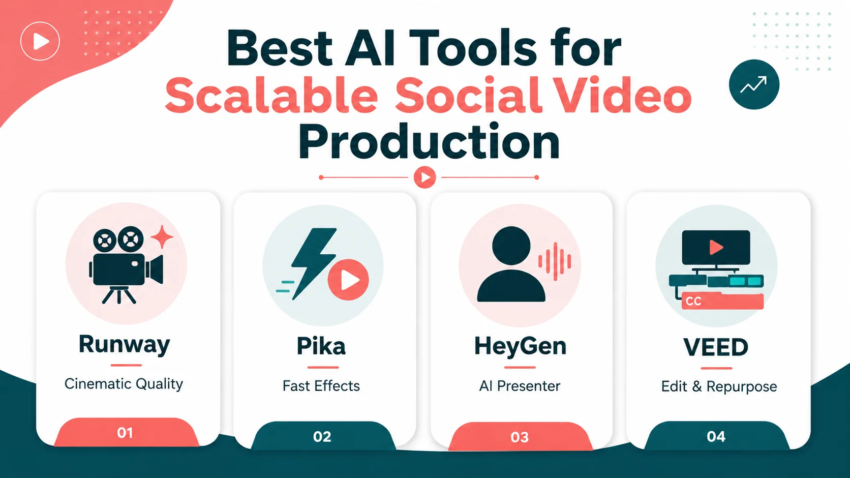
Runway (Gen-4.5) This is the one I reach for when a client needs something that actually looks cinematic — product shots, branded visuals, anything where quality is the whole point. The image-to-video feature is genuinely useful for social content: you feed it a reference image, tell it how the camera should move, and it extends realistically from there. The catch is credits. The $12/month Standard plan gives you 625 credits, and a single 10-second Gen-4.5 clip eats around 250 of them. That’s roughly two clips a month on the entry plan — nowhere near enough for daily posting unless you’re on a higher tier.
Pika (Pika Art) Where Runway is the quality play, Pika is the speed and personality play. It generates clips noticeably faster than Runway, and its effect tools — melting, exploding, object swaps, mid-scene character changes — are exactly the kind of visually surprising clips that actually perform on TikTok and Reels. When a client needed volume over polish, this became my go-to.
HeyGen This solved a completely different problem for me: talking-head content without ever booking a filming day. HeyGen generates presenter-style videos using AI avatars and voice synthesis, which turned out to be perfect for explainer content, product walkthroughs, and short thought-leadership clips. It doesn’t edit existing footage or handle scheduling — it’s purely a generation tool for one specific content type, and it’s very good at that one thing.
VEED This became the glue that held my actual workflow together. Instead of generating from scratch, VEED is built around taking existing footage and turning it into platform-ready content fast — automated captions, one-click resizing for every major platform, and a browser-based editor that doesn’t require learning a whole new interface. For repurposing one long video into five different social cuts, this saved me more time than any generation tool did.
The Actual Step-by-Step Workflow I Ended Up Using – Best AI-Driven Tool for Scalable Social Media Video Production
Here’s the process that finally got me from “two videos a week” to genuinely scalable daily output, without burning through a full production team’s worth of hours.
Step 1: Batch your scripts first, separately from production.
I used to write scripts one at a time right before generating each video. Batching a week’s worth of scripts in one sitting cut my actual production time nearly in half, because I wasn’t constantly switching between writing mode and tool mode.
Step 2: Match the content type to the right generation tool.
Product visuals and branded scenes went to Runway. Fast, punchy, trend-style clips went to Pika. Talking-head explainers went to HeyGen. I stopped trying to force one tool to do a job it wasn’t built for, which is exactly the mistake that wasted my first weekend.
Step 3: Generate in small batches, not one at a time.
Most of these tools let you queue multiple generations. I’d set up four or five prompts before walking away, instead of babysitting each one individually.
Step 4: Run everything through a single repurposing pass.
Once raw clips were generated, everything went through VEED for captions, resizing, and final polish. This is the step that actually made scaling possible — one editing pass turned each generated clip into three or four platform-specific versions.
Step 5: Review before publishing, every single time.
I’ll get into why in the mistakes section below, but skip this step at your own risk.

The Mistake That Almost Got a Client’s Account Flagged
Early on, I got a little too comfortable with the speed and started publishing HeyGen avatar videos without watching the full clip beforehand. On one video, the lip-sync drifted noticeably out of alignment about halfway through — subtle enough that I missed it in a quick scrub-through, but obvious enough that half the comments on that post were people pointing it out.
Nothing catastrophic happened, but it was embarrassing, and it taught me a rule I don’t break anymore: every single AI-generated video gets watched in full, at real speed, before it goes anywhere near a publish button. The time you save generating video disappears fast if you have to spend it fielding comments about a glitchy avatar.
A Real Example From My Own Work
For a client who sells outdoor gear, I built a simple weekly system: one real product photo, run through Runway for a short cinematic pan-and-zoom style clip, paired with a HeyGen presenter clip explaining the product’s main feature, then both stitched and captioned together in VEED into a single 30-second Reel.
What used to require booking a videographer for a half-day shoot became a two-hour process I could do myself between other tasks. The engagement wasn’t identical to a fully produced shoot, but it was close enough that the client stopped asking for the old process entirely once they saw the volume increase.
Common Mistakes to Avoid
Chasing one all-in-one tool instead of building a stack.
I said it above, but it’s worth repeating because it’s the single biggest time-waster I see people fall into.
Ignoring credit limits until you run out mid-week.
Most generation tools run on credit systems, and it’s genuinely easy to underestimate usage once you’re producing daily. Map out your expected weekly output against your plan’s credit allowance before committing.
Publishing without a real review pass.
As covered above — lip-sync drift, weird generation artifacts, and awkward pacing slip through more often than you’d expect, especially when you’re moving fast.
Using the same tool for every content type.
A cinematic product shot and a fast trend-style clip need different tools. Forcing one tool to do both usually means mediocre results on at least one of them.
Skipping the repurposing step entirely.
Generating one video per platform from scratch instead of repurposing a single generated clip across formats is the fastest way to burn through both time and credits unnecessarily.
Final Thoughts
The “one tool that does it all” doesn’t really exist yet, and honestly, chasing that idea is what wasted most of my early time with AI video tools. What actually works is picking two or three tools that each do one job well, building a repeatable process around them, and being disciplined about reviewing what comes out before it goes live.
Once that clicked for me, the ridiculous ask of “two Reels a day” stopped being a joke and turned into a normal Tuesday.

Hamad Arshad
SEO Specialist | SEO Manager | GEO Strategist
7+ Years of Experience in SEO, GEO, AEO, AI SEO, Local SEO, Technical SEO, PPC, Google Ads & Meta Ads.








Leave a Reply