
Advantages of Information and Communication Technology for Students and Families
Introduction
Information and communication technology, or ICT, has moved from being a classroom extra to a daily fact of life for most students and families. Laptops, tablets, learning apps, messaging platforms, and online resources now sit alongside textbooks and dinner-table conversations. For parents deciding how much screen time to allow, and for students trying to make the most of the tools available to them, the real question isn’t whether ICT matters — it’s understanding exactly how it helps, where it falls short, and how to use it well.
This guide breaks down the practical advantages of ICT for students and families, grounded in how these tools are actually used in homes and schools today, along with the mistakes to avoid and the limits worth knowing about.
Quick Answer: How ICT Benefits Students and Families
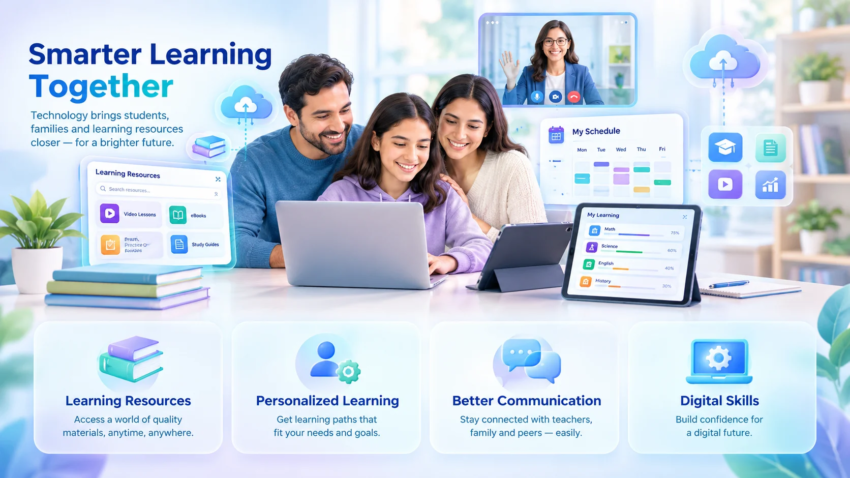
The advantages of information and communication technology for students and families center on four things: broader access to learning resources, more personalized and flexible education, stronger communication between home and school, and better preparation for a digital world. Students gain tools for self-paced learning, collaboration, and skill-building, while families benefit from easier coordination, shared learning opportunities, and access to support resources they might not otherwise reach. These benefits are strongest when ICT is used deliberately, not simply added on top of existing habits.
What Counts as ICT? A Quick Definition
ICT covers any technology used to create, store, exchange, and communicate information. In an education and family context, that includes computers and tablets, the internet and school Wi-Fi networks, educational software and apps, learning management systems like Google Classroom, video-calling tools, messaging platforms used by schools, and even smartboards in classrooms. It’s a broader category than “screen time” — a video call with a grandparent, a research task on a library database, and a math app all fall under ICT, even though they serve very different purposes. Understanding this range matters, because lumping all screen-based activity together is one of the most common reasons families and schools misjudge whether tech use is helping or hurting.
Advantages of ICT for Students
Access to Unlimited Learning Resources
The most immediate advantage of ICT is scale. A student with internet access can reach encyclopedias, primary historical documents, peer-reviewed research summaries, video explanations, and interactive simulations that no single school library could hold. A student struggling with a concept in class isn’t limited to one textbook’s explanation — they can find three or four different ways the same idea is taught until one clicks. This doesn’t replace teaching, but it removes a real bottleneck: previously, a student who didn’t understand something in the moment often had to wait until the next class to get another explanation.
Personalized and Self-Paced Learning
Adaptive learning platforms and educational apps adjust to a student’s pace, offering more practice on weak areas and moving faster through material a student has already mastered. This matters because traditional classroom pacing has to serve an average, which underserves both struggling and advanced students. ICT tools that track performance and adjust difficulty give students something closer to individualized instruction, even in a class of thirty. A typical example is a math app that automatically shifts to easier problems after repeated mistakes and introduces harder ones once a student is consistently correct — something a single teacher can’t do in real time for every student simultaneously.
Better Collaboration and Communication Skills
Group projects, shared documents, and classroom messaging tools mean students now regularly practice coordinating with others remotely — dividing tasks, giving feedback in writing, and managing shared deadlines. These are the same skills used in most modern workplaces. A student who has worked on a shared slide deck with classmates, tracked changes, and resolved conflicting edits has practiced a form of collaboration that goes beyond what group work looked like a generation ago.
Development of Digital Literacy and Future-Ready Skills
Digital literacy — the ability to find reliable information, evaluate sources, use software effectively, and communicate professionally online — has become as fundamental as reading and arithmetic. Students who use ICT regularly, and are taught to use it critically, build habits like checking a source before trusting it, organizing digital files, and troubleshooting basic technical problems. These are transferable skills that matter well beyond any single subject.
Support for Different Learning Styles and Special Needs
ICT has been particularly valuable for students who don’t fit neatly into a standard classroom format. Text-to-speech tools help students with dyslexia. Speech-to-text software supports students with motor difficulties. Closed captions and adjustable playback speed help students processing a second language or an auditory processing difference. Assistive technology in this category doesn’t just make learning easier — for some students, it makes standard curriculum accessible at all, which is a meaningfully different kind of advantage than convenience.
Real-Time Feedback and Progress Tracking
Many learning platforms show students their results immediately rather than days later, and give parents and teachers visibility into progress through dashboards. This shortens the feedback loop that learning depends on — a student who gets an answer marked wrong immediately, with an explanation, learns differently than one who finds out a week later on a returned test. For teachers, the same dashboards flag which students are falling behind before it becomes a bigger problem.

Advantages of ICT for Families
Stronger Home-School Communication
Before ICT, most home-school communication happened through paper notices that were easy to lose and infrequent parent-teacher conferences. Messaging apps, school portals, and email updates now let parents see assignments, grades, and announcements in near real time. A parent can know a project is due Friday on Monday, rather than finding out Thursday night. This shift has measurably reduced the information gap between what’s happening at school and what parents know about it.
Shared Learning and Family Involvement
ICT has created more opportunities for families to learn alongside their children rather than simply supervising homework. Educational videos, documentaries, and interactive apps designed for family use let parents and children explore a topic together, which supports both engagement and the child’s sense that learning matters at home, not just at school. A family watching a science explainer together and then discussing it is a form of involvement that didn’t have an easy equivalent before video content was this accessible.
Convenience in Managing Schedules and Logistics
Shared calendars, school apps, and messaging groups make it easier for families — especially those juggling multiple children, jobs, or households — to track school events, permission slips, extracurricular schedules, and deadlines in one place instead of relying on paper or memory. For families managing custody arrangements, working non-traditional hours, or living apart from extended support networks, this coordination advantage is often understated but significant in day-to-day life.
Access to Support Networks and Resources
Parent groups, school community pages, and online forums connect families to advice and support they might not have access to locally — whether that’s other parents navigating the same learning difficulty, a support group for a specific diagnosis, or simply practical tips from other families at the same school. For families in rural areas or without a local peer network, this access can matter more than any single app or tool.
Real-World Examples of ICT in Action
- A student uses an app that adapts practice problems based on mistakes, cutting down on time spent on material they’ve already mastered.
- A family in a rural area accesses tutoring support online that isn’t available within driving distance.
- A parent working irregular hours keeps up with school announcements through a messaging app instead of missing paper notices sent home.
- A student with dyslexia uses text-to-speech software to keep up with reading assignments at the same pace as classmates.
- A class collaborates on a shared research document, each student responsible for a different section, with the teacher commenting directly on the draft.
- Grandparents who live far away join a video call to hear a child read aloud, keeping them involved despite distance.
Common Mistakes Families and Schools Make With ICT
Treating all screen time as equal. Passive video consumption and active, interactive learning are not the same, but they often get grouped together in screen-time discussions, which leads to either unnecessary restriction of useful tools or unchecked use of unhelpful ones.
Introducing tools without a routine. Handing a student a device or app without a plan for when and how it’s used tends to lead to distraction rather than learning. A common mistake is assuming the tool itself creates good habits, when in practice the routine around it does most of the work.
Assuming more access automatically means more learning. Access to resources doesn’t guarantee use of them. Without some structure — a set task, a check-in, a shared goal — unlimited access can turn into unlimited scrolling.
Overlooking digital literacy instruction. Many schools and families introduce ICT tools without explicitly teaching how to evaluate sources, spot misinformation, or use search effectively, which limits how much value students actually get from access to information.
Ignoring the access gap. Assuming every family has reliable internet and updated devices skips over a real barrier. Advantages of ICT only apply where access exists, which is an important limitation to keep in mind when comparing outcomes across different students or schools.
Where ICT Falls Short (And What It Can’t Replace)
ICT is not a substitute for direct instruction, in-person social interaction, or a teacher’s judgment about an individual student’s needs. A well-designed app can adapt to performance data, but it can’t read a student’s frustration the way a teacher in the room can. Group video calls support collaboration, but they don’t fully replace the informal social learning that happens in a physical classroom or playground. And for younger children in particular, guidance bodies such as the American Academy of Pediatrics recommend limits on screen time precisely because the benefits of ICT depend heavily on the type of use and the child’s age — not all screen time functions as learning.

There’s also a real equity limitation. Families without reliable internet or updated devices don’t get these advantages at all, and in some cases the gap between well-resourced and under-resourced students can widen rather than shrink when a school leans heavily on tools that assume home access. Any honest look at ICT’s advantages has to include this caveat rather than presenting universal access as a given.
Expert Tips for Using ICT Effectively at Home and School
- Set a purpose before opening a device. A specific task (“finish this reading module”) tends to produce better outcomes than open-ended “screen time.”
- Separate learning tools from entertainment tools where possible, even if it’s just a different device, folder, or profile — this reduces the temptation to drift from one to the other.
- Review progress dashboards together rather than only checking grades at report-card time; this turns ICT into a conversation starter rather than a surveillance tool.
- Teach source evaluation directly. A five-minute conversation about why a source is or isn’t reliable does more for digital literacy than restricting access altogether.
- Build in offline time deliberately, especially for younger children, rather than treating it as a fallback when something goes wrong with a device.
- Check school communication tools weekly, not just when a notification arrives, since some announcements don’t trigger a strong alert.
Frequently Asked Questions
What is ICT and how is it different from just “technology”? ICT specifically refers to tools used for communicating and managing information — computers, the internet, apps, and messaging platforms — rather than technology in general, which could include anything from a calculator to a 3D printer.
What are the main advantages of ICT for students? Broader access to learning resources, personalized pacing, stronger digital literacy, better collaboration skills, support for different learning needs, and faster feedback on performance.
How does ICT help families, not just students? It improves communication between home and school, makes scheduling and logistics easier to manage, creates shared learning opportunities, and connects families to support networks they might not otherwise access.
Does ICT actually improve academic performance? It can, particularly when used for active, targeted learning like adaptive practice or guided research — but passive or unstructured use doesn’t show the same benefit, so the outcome depends heavily on how the tools are used, not just whether they’re available.
What are the risks of relying too much on ICT? Reduced attention span from constant switching between tasks, less face-to-face social practice, over-reliance on tools instead of independent problem-solving, and unequal access widening gaps between students.
How much screen time is appropriate for learning? This varies by age and the type of activity; pediatric guidance generally recommends limits for younger children and distinguishes between passive and interactive use rather than setting one blanket number for all screen time.
What ICT tools should a family start with? A school-provided communication app or portal, one well-reviewed educational app matched to a specific subject need, and a shared family calendar tend to offer the most practical value without overwhelming a household.
Does ICT widen or narrow the education gap? Both are possible. It narrows the gap when access and support are equal; it widens the gap when only some students have reliable devices and internet, which is why access remains a genuine limitation of ICT’s benefits.
Can ICT support children with learning difficulties? Yes — assistive technology such as text-to-speech, speech-to-text, and adjustable-pace video has made curriculum more accessible for students with dyslexia, processing differences, and some motor or sensory needs.
How can parents stay involved without hovering? Checking in through shared dashboards or weekly reviews rather than monitoring every session, asking students to explain what they learned rather than watching over their shoulder, and treating ICT tools as something to discuss together rather than only supervise.
Final Takeaway
ICT gives students more access, more personalization, and more ways to build skills that matter beyond the classroom, while giving families better communication, coordination, and shared learning opportunities. None of that happens automatically just because a device is in the house — the advantages show up clearly when ICT is used with a purpose, taught alongside basic digital literacy, and balanced against its real limitations, including unequal access and the difference between passive and active use. The most effective approach isn’t maximizing screen time or avoiding it altogether; it’s being intentional about which tools serve a specific learning or communication goal, and building routines around them that make the benefits consistent rather than incidental.

Hamad Arshad
SEO Specialist | SEO Manager | GEO Strategist
7+ Years of Experience in SEO, GEO, AEO, AI SEO, Local SEO, Technical SEO, PPC, Google Ads & Meta Ads.






Leave a Reply