
Best AI Tools for Small Business No Code: A Practical Starter Guide
Running a small business with no dedicated technical staff doesn’t mean AI is out of reach — it means being selective about which tools actually deliver on “no code.” A lot of AI products market themselves as easy to use, then quietly expect you to write a formula, connect an API, or understand a database schema the moment you want to do anything beyond the demo. This guide to the best AI tools for small business no code needs only covers tools that hold up to that bar: genuinely usable by a small business owner with zero technical background.
This is written for freelancers and small business owners who want practical automation, app-building, or content tools they can set up themselves this week not a developer’s roadmap. We’ll define what “no code” should actually mean, walk through the strongest tool in each functional category, cover realistic pricing, and be honest about where these tools eventually hit a ceiling.
Quick Answer: The No-Code AI Tools Worth Starting With
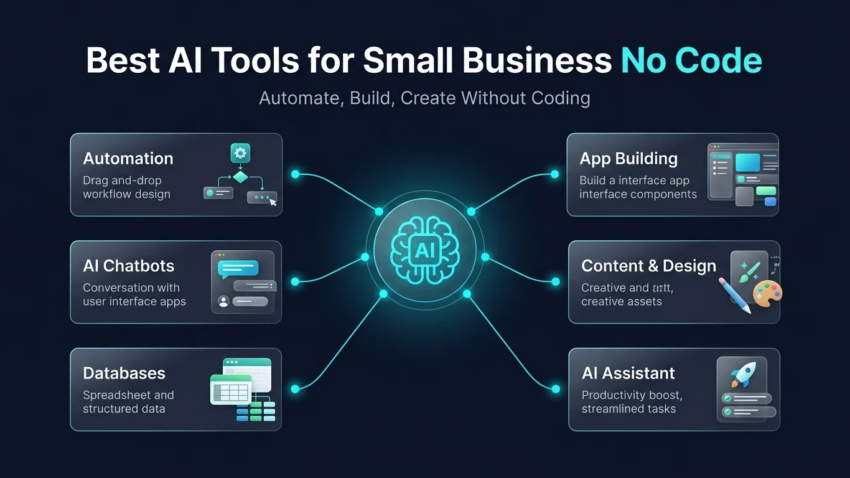
For most small businesses, the strongest starting stack is Zapier for automating repetitive tasks between apps using plain-English instructions, Glide or Bubble for building a simple internal or customer-facing app from existing spreadsheet data, Voiceflow or Botpress for a no-code AI chatbot, Airtable for an AI-enhanced database that doubles as a lightweight internal tool, and ChatGPT or Canva AI for everyday content and design work. Most of these offer a usable free tier, so testing two or three before committing to a paid plan is a reasonable way to find what actually fits your workflow.
What “No Code” Actually Means for an AI Tool
Not every tool that claims to be “no code” actually is once you get past the marketing page — which matters a lot when you’re specifically searching for the best AI tools for small business no code requirements, not just the best AI tools in general. A genuinely no-code AI tool lets you build, automate, or generate something useful through a visual interface, plain-English prompts, or drag-and-drop building blocks — with no requirement to write a formula, script, or line of code at any point in the core workflow. Some platforms blur this line, offering a no-code surface for basic use but requiring scripting or API knowledge the moment you want meaningful customization; those tools are better described as low-code, and it’s worth knowing the difference before you invest setup time expecting a purely visual experience.
How These No-Code AI Tools Were Evaluated
Every tool in this roundup of the best AI tools for small business no code needs was evaluated specifically against three criteria: whether its core functionality — not just a stripped-down demo — is achievable without writing any code; whether a small business owner with no technical background could realistically complete setup without outside help; and whether pricing is transparent enough to actually plan around, rather than requiring a sales call to learn the real cost. Tools that require scripting, API keys, or developer-level configuration for anything beyond the most basic use case were excluded or clearly flagged as low-code rather than no-code.
The Best No-Code AI Tools for Small Business, by Category
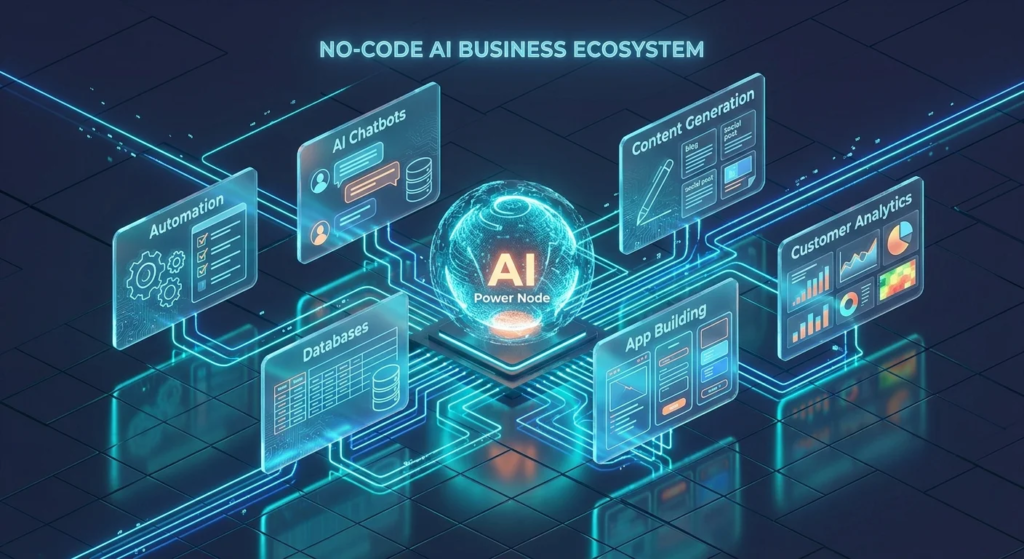
The categories below cover the full range of what searchers typically mean by best AI tools for small business no code — automation, app-building, chatbots, internal databases, content, and general assistance — so you can jump to whichever matches your actual bottleneck.

Best for Automating Repetitive Tasks
Zapier is the clearest starting point for automating the manual, repetitive work most small businesses do by hand — moving new leads into a CRM, sending a welcome email, syncing data between apps. Its AI layer now lets you describe an automation in plain English and have it build the workflow steps for you, and its AI actions let individual steps in a workflow use language models to process or summarize text along the way. The free tier covers a limited number of monthly automations, with paid plans starting under $20/month for more volume. Make and n8n are strong alternatives worth considering if Zapier’s specific app integrations don’t cover a tool you rely on, or if you want more visual control over complex multi-step workflows.
Best for Building a Simple App Without a Developer
Glide turns an existing spreadsheet (Google Sheets, Excel, or Airtable) into a working mobile or web app, using AI to help generate the interface and logic without requiring any code — a strong fit for a small business that wants a simple internal tool (inventory lookup, client directory) or lightweight customer-facing app quickly. Bubble offers a more powerful, flexible visual app builder for businesses that outgrow a spreadsheet-based approach, still without requiring code for most use cases, though its learning curve is somewhat steeper than Glide’s.
Best for a No-Code AI Chatbot or Virtual Assistant
Voiceflow and Botpress both offer visual, drag-and-drop builders specifically for designing AI-powered chatbots and conversational flows — handling common customer questions, routing support tickets, or qualifying leads — without requiring any backend development. Both integrate with common business tools and offer a free tier for testing before committing to a paid plan, making either a reasonable starting point for a small business wanting a first AI chatbot without hiring outside help.
Best for AI-Powered Databases and Internal Tools
Airtable combines a familiar spreadsheet-like interface with AI agents that can work across your records — summarizing, categorizing, or triggering actions based on your data — while remaining entirely no-code for standard use. It’s a particularly strong fit for a small business whose day-to-day operations already live in spreadsheets, since it upgrades that existing habit into something closer to a lightweight internal application without requiring a rebuild from scratch.
Best for Content, Design, and Marketing
Canva AI remains the most accessible no-code option for marketing graphics, social content, and basic presentation design, combining an easy visual interface with a genuinely usable free tier. For written content specifically, general-purpose AI assistants (covered next) tend to cover most small business needs without requiring a dedicated content tool at all.
Best General-Purpose AI Assistant
ChatGPT remains the most flexible starting tool for everyday business writing, research, and quick analysis — genuinely no-code in the sense that it requires nothing beyond typing a request in plain language, and its free tier is capable enough for most small business use before any paid upgrade is necessary. It’s worth having as a baseline tool even alongside the more specialized options above, since it covers the countless smaller tasks that don’t justify a dedicated tool of their own.
What These No-Code AI Tools Typically Cost
Realistic small business costs for a modest no-code AI stack currently run roughly as follows: Zapier’s free tier covers a limited number of monthly tasks, with paid plans starting under $20/month; Glide, Bubble, Voiceflow, and Botpress all offer usable free tiers for testing, with paid plans commonly starting somewhere in the $20–50/month range depending on usage volume; Airtable’s AI features are available on paid plans that typically start in a similar range once you move beyond its free tier’s record limits; and Canva AI and ChatGPT both offer meaningfully capable free tiers before any paid upgrade becomes necessary. A realistic starting budget for a small business testing two or three of these tools seriously is often well under $100/month total — confirm current pricing directly with each vendor before budgeting, since this category’s pricing shifts fairly often.
Where No-Code AI Tools Hit Their Limits
No-code AI tools are genuinely capable for a large share of small business needs, but it’s worth being honest about where they stop being enough. Highly customized business logic, complex integrations between systems that don’t have a pre-built connector, and applications needing to scale to a large volume of users or data often eventually require actual development work, even if a no-code tool got you started. Data ownership and portability can also be a real constraint — some no-code platforms make it harder to migrate your work elsewhere than a custom-built solution would, which is worth considering if long-term flexibility matters to your business. None of this is a reason to avoid no-code tools — it’s a reason to treat them as an excellent starting point rather than assuming they’ll scale indefinitely without ever needing outside technical help.
A Simple Way to Choose Your First Tool
- Identify your single biggest repetitive task first. Don’t try to adopt five tools at once — pick the one manual process eating the most time and start there.
- Check whether it’s a spreadsheet, a conversation, or a connection problem. Repetitive data movement points to Zapier or Make; customer questions point to a chatbot builder; a need for a simple app points to Glide or Bubble.
- Use the free tier before paying for anything. Every tool covered here has a usable free tier — test with real work for a week or two before committing to a paid plan.
- Confirm it’s genuinely no-code for your specific use case, not just the demo, before investing real setup time.
- Expand deliberately. Add a second tool only once the first is actually saving you time, rather than adopting a full stack on day one.
Common Mistakes When Adopting No-Code AI Tools
Assuming “no code” means “no learning curve.” Even genuinely no-code tools take some time to learn their specific interface — budget a few hours, not zero.
Picking a tool based on features you won’t actually use. The most feature-rich option isn’t necessarily the right first tool — matching the tool to your actual bottleneck matters more than a long feature list.
Not testing the free tier before assuming a paid plan is necessary. Every tool in this roundup offers a meaningful free tier — many small business needs are fully covered without ever paying.
Ignoring data portability until it’s a problem. Not checking how easily your data or workflows could move to a different tool later is a common oversight that only becomes painful once you’re deeply invested in one platform.
Trying to automate a process that isn’t actually consistent yet. No-code automation works best on a process that already follows a predictable pattern — automating something that’s still changing week to week usually just automates the confusion.
FAQs About No-Code AI Tools for Small Business
What is a no-code AI tool? It’s an AI-powered product that lets you build, automate, or generate something useful through a visual interface, plain-English instructions, or drag-and-drop components, without writing any code at any point in the core workflow.
What’s the easiest no-code AI tool to start with? For most small businesses, Zapier is the most approachable starting point, since it directly addresses the manual, repetitive tasks nearly every business deals with, using a plain-English builder and a genuinely usable free tier.
How much do no-code AI tools cost for a small business? Most of the tools covered here offer usable free tiers, with paid plans commonly starting in the $15–50/month range depending on the tool and usage volume — a realistic starting budget testing two or three tools seriously is often well under $100/month total.
Can I really build something useful without any coding knowledge? Yes, for a genuinely wide range of small business needs — automation, simple apps, chatbots, and internal databases are all achievable through the tools covered here without writing code, though some customization eventually benefits from technical help as needs grow more complex.
What’s the difference between no-code and low-code AI tools? No-code tools require zero coding for their core functionality; low-code tools offer a visual, easier-to-use surface but require scripting or technical configuration once you go beyond basic use — some platforms marketed as “no-code” are more accurately low-code once you look past the initial demo.
What are the limits of no-code AI tools? Highly customized business logic, integrations without a pre-built connector, and applications needing significant scale often eventually require actual development work — no-code tools are an excellent starting point, not necessarily a permanent ceiling-free solution.
Is Zapier considered a no-code AI tool? Yes — its core automation-building experience requires no code, and its AI layer (plain-English automation building and AI-powered workflow steps) extends that same no-code approach into AI-specific tasks.
Can I build a mobile app with AI and no code? Yes — tools like Glide and Bubble both let you build functional mobile or web apps from existing data or a visual builder, without writing code, though highly custom or large-scale apps eventually benefit from developer involvement.
Do no-code AI tools require a subscription to be useful? Not necessarily — every tool covered in this guide offers a free tier capable enough for meaningful real use, though higher usage volume or advanced features typically require a paid plan.
When should I hire a developer instead of using a no-code tool? Once your needs involve complex custom logic, integrations without an existing connector, or a scale of users/data that a no-code platform’s architecture wasn’t built for, bringing in a developer — even just for that specific piece — tends to be more efficient than forcing a no-code tool past its practical ceiling.
Final Takeaway
The best AI tools for small business no code needs aren’t the ones with the longest feature list — they’re the ones that actually deliver a working result without requiring you to learn to code along the way. Start with the single repetitive task costing you the most time, test the relevant tool’s free tier for a week or two, and expand your stack only once that first tool is genuinely earning its place. That approach gets real value out of no-code AI faster than trying to adopt an entire stack on day one, and it holds up regardless of which specific tools lead each category next year.

Hamad Arshad
SEO Specialist | SEO Manager | GEO Strategist
7+ Years of Experience in SEO, GEO, AEO, AI SEO, Local SEO, Technical SEO, PPC, Google Ads & Meta Ads.




Leave a Reply