
Best Customizable Worksheet AI Software: How to Pick One You Can Actually Edit
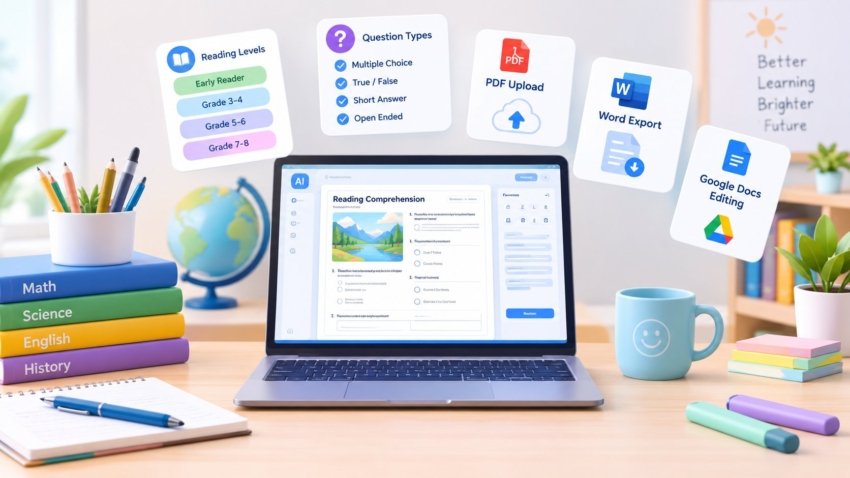
Plenty of tools call themselves “AI worksheet generators,” but far fewer actually let you change much once the page is generated. If you’ve tried one that only lets you swap the topic and nothing else, you already know the frustration — you needed three reading levels of the same passage, or a worksheet built from a specific PDF, and the tool just wasn’t built for that. This guide focuses specifically on customization depth: which tools let you control the source material, structure, and format, and which ones just generate a fixed template with your topic dropped in.
Quick Answer: The Tools Worth Trying First
If you need to turn a text you already have into several reading levels at once, Diffit is built specifically for that. If you want AI worksheet generation without ever leaving your existing Google Docs workflow, Brisk Teaching works directly inside the doc and is free with no cap. If you want one platform that also handles standards alignment alongside 80-plus other teaching tools, MagicSchool AI is the broader pick. And if you need output you can fully rewrite afterward, TeacherMatic exports in an editable Word-compatible format rather than a locked layout. Which one is “best” depends entirely on which of those four needs matters most to you.
Why “AI Worksheet Generator” and “Customizable” Aren’t the Same Thing
Most tools in this category can generate a worksheet from a topic in seconds — that part is now table stakes. What actually varies is how much of the result you can control before and after generation: can you supply your own source text instead of a generic topic, choose specific question types, set a reading level, and then edit the output freely afterward? A tool that only offers a topic box and a locked template isn’t customizable in any meaningful sense, even if its marketing uses the word. That distinction is exactly what’s worth checking before you commit time to learning any specific platform.
What Real Customization Actually Looks Like
Before comparing tools, it helps to know what to actually check for:
- Source flexibility — can you paste text, upload a PDF, or link a video, rather than only typing a topic?
- Reading-level control — can the same source generate multiple leveled versions for differentiation?
- Question-type control — multiple choice, short answer, fill-in-the-blank, and so on, chosen deliberately rather than fixed.
- Post-generation editing — is the output something you can actually rewrite, or a locked layout you can only regenerate from scratch?
- Export format — PDF-only limits reuse; Word or Google Docs export lets you keep editing later.
Best Customizable Worksheet AI Software Compared

Best for Turning Your Own Text Into Leveled Worksheets
Diffit takes a text you already have and adapts it into multiple reading levels, which makes it the strongest pick specifically for differentiation — giving struggling and advanced students the same content at a level each can access, without rebuilding the worksheet by hand for each group.
Best for Working Inside Google Docs
Brisk Teaching generates worksheets without requiring you to leave a Google Doc, which is a genuine convenience if your workflow already lives there. It’s free and uncapped, making it a low-friction way to try AI generation before evaluating a dedicated platform.
Best All-in-One With Standards Alignment
MagicSchool AI lets you set grade level, reading level, question types, and length, and can incorporate state standards or district frameworks into the output — useful if alignment documentation matters for your school, and it comes bundled with a much broader set of teaching tools beyond worksheets specifically.
Best for Fully Editable Word Export
TeacherMatic and Teachmate both export in formats you can reopen and rewrite in Word, rather than a fixed layout — worth prioritizing if your actual complaint with past tools has been “I couldn’t change it enough after it was generated.” Canva is also worth knowing here for a different reason: it’s not really an AI content generator, but its drag-and-drop template library makes visual customization (icons, layout, branding) genuinely easy once your questions and text are locked in.
Common Mistakes When Choosing a Worksheet Tool
Judging “customizable” from marketing copy alone. Checking whether you can upload your own source text, not just a topic, is the fastest real test.
Ignoring what the free tier actually caps. Free plans often limit exactly the features — export format, number of leveled versions, editing — that matter most for real customization.
Picking an all-in-one platform when you only need worksheets. A broad teaching-assistant tool is more to learn than necessary if worksheet generation from your own material is genuinely all you need.
Where Even the Best Tool Still Needs a Human Pass
No current tool reliably produces a classroom-ready worksheet on the first try without review — question wording, difficulty calibration, and factual accuracy from AI-generated content should be checked before handing it to students, the same way you’d review any resource before using it. Treat the AI output as a strong first draft, not a finished product.

Expert Tips for Getting Better First Drafts
- Upload your own source material whenever a tool allows it, rather than typing a bare topic — output quality is noticeably better with real context to work from.
- Generate multiple reading levels from the same source in one pass if your tool supports it, instead of regenerating separately for each group.
- Check the export format before committing to a tool, since a locked PDF is far less useful long-term than an editable Word or Docs file.
Frequently Asked Questions
It depends on the specific need — Diffit for leveled versions of your own text, MagicSchool for standards alignment, and TeacherMatic for fully editable Word export are each the strongest option for a different kind of customization.
Yes, on tools built for that specifically, like Diffit — many generic worksheet generators only accept a topic, so checking this before choosing a tool matters.
On tools like TeacherMatic and Teachmate, yes, since they export to an editable Word-compatible format; some other tools lock you into their own interface for edits only.
Brisk Teaching is free and uncapped for its core worksheet generation inside Google Docs; most other tools offer a limited free tier with paid plans for full customization features.
A dedicated generator (like Diffit) does one job well; an all-in-one platform (like MagicSchool) bundles worksheet generation with lesson planning, rubrics, and other tools, which is worth it only if you’ll actually use the broader toolset.
Yes, specifically with Diffit, which is built around exactly that use case for differentiation.
Yes — MagicSchool can incorporate state standards and district frameworks directly into generated materials.
TeacherMatic and Teachmate both export in Word-compatible formats rather than a fixed, locked layout.
Final Takeaway
The best customizable worksheet AI software isn’t the one with the flashiest generation speed — it’s the one that lets you control the source material, reading level, and format enough to actually fit your specific students. Match the tool to your real need: Diffit for leveled differentiation, Brisk for a free in-Docs workflow, MagicSchool for standards alignment alongside broader tools, or TeacherMatic for fully editable Word output — and always give the generated draft a human review pass before it reaches students.

Hamad Arshad
SEO Specialist | SEO Manager | GEO Strategist
7+ Years of Experience in SEO, GEO, AEO, AI SEO, Local SEO, Technical SEO, PPC, Google Ads & Meta Ads.







Leave a Reply